

ZED Link GMSL2 capture cards
If you recently purchased a StereoLabs ZED Link GMSL2 capture card, congratulations! This guide aims to help you become acquainted with the GMSL2 protocol and to give you the essential information you need to begin utilizing StereoLabs ZED Link GMSL2 capture cards with NVIDIA® Jetson™ devices and our GMSL2 stereo and monocular cameras.
What is GMSL2?
Gigabit Multimedia Serial Link (GMSL2) is a serial communication protocol that uses Analog Devices’ proprietary technology to transport high-speed, serialized data over coax or shielded-twisted pair (STP) cables for automotive camera and display applications. GMSL2 links operate at fixed data rates, including 3 Gbps or 6 Gbps on the forward channel, and 187Mbps on the reverse channel, depending on device capabilities and configuration. The figure shows a block diagram of a typical GMSL2 system.
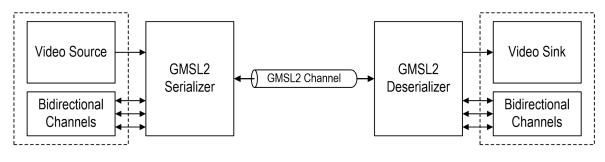
Source Analog Devices - GMSL2 Channel Specification User Guide - Rev 1
You can find detailed information about the GMSL2 configuration for our ZED Link cards in the respective datasheets.
The ZED X One Core does not use GMSL2. It streams MIPI CSI-2 data and requires a ZED Link MIPI capture card, described on the ZED Link MIPI capture cards page.
Setting up your system for using a GMSL2 camera
If you own a ZED Box Orin or a ZED Box Mini, you can directly proceed to the guide to Install the ZED Link driver.
Make sure to have the necessary hardware to support the GMSL2 connection of the StereoLabs GMSL2 cameras.
In this section, we will explain which configurations work with the GMSL2 capture cards and provide instructions on how to set them up.
Please note that our GMSL2 cameras are only compatible with NVIDIA® Jetson™ platforms. Here is the list of currently supported NVIDIA® Jetson™ models along with the corresponding setup guide link for your hardware.
The ZED Box Orin now includes GMSL2 connectivity as a standard feature. Older units could be purchased without a pre-installed GMSL2 capture card: that configuration is no longer available, and a capture card cannot be added to such a unit afterwards.
The ZED Box Orin features a passive heat dissipation system that could be damaged if the device is disassembled, potentially causing failures and serious damage to the NVIDIA® Jetson™ module. As a result, the warranty will be void if the device is opened.
ZED Link Mono capture card
The ZED Link Mono enables you to connect ZED X, ZED X Mini, ZED X Nano, ZED X One GS, or ZED X One 4K cameras to specific NVIDIA® Jetson™ devices:
ZED Link Duo capture card
The ZED Link Duo enables you to connect ZED X, ZED X Mini, ZED X Nano, ZED X One GS, or ZED X One 4K cameras to specific NVIDIA® Jetson™ devices:
ZED Link Quad capture card
The ZED Link Quad enables you to connect ZED X, ZED X Mini, ZED X Nano, ZED X One GS, or ZED X One 4K cameras to specific NVIDIA® Jetson™ devices:
Multi-Camera Combinations
Please refer to each of the setup guides for the ZED Link Duo and Quad capture cards to understand how to connect multiple cameras to the same capture card, and the different behaviors that can be expected according to the camera types and their connection ports on the capture card.
Hardware reference
- CAD Files - the most up-to-date CAD files of all our products.