

Global Localization Overview
The ZED SDK’s Global Localization module enables real-time camera tracking and localization in a global coordinate system. It leverages the power of the ZED stereo camera and GNSS data to provide accurate and robust localization capabilities for your applications. By combining visual odometry with GNSS positioning, the ZED SDK can determine the camera’s precise position and orientation relative to a global reference frame.

This module requires a stereo camera equipped with an inertial sensor (IMU), such as the ZED 2/2i, ZED Mini, ZED X, ZED X Mini, ZED X Nano. The following cameras are not supported:
- The original ZED (out of production), which has no built-in IMU.
- The ZED X One GS/4K/S cameras, which are monocular.
The ZED SDK’s Global Localization feature not only provides real-time camera tracking and localization in a global coordinate system but also operates in GNSS-denied environments. This means that even when satellite-based GNSS data is unavailable or unreliable, the ZED SDK can still determine the camera’s global position with centimeter precision.
How It Works
Global localization in the ZED SDK is achieved by fusing data from three key sources: stereo vision, IMU, and GNSS. By combining these three data sources, the ZED SDK can deliver robust and accurate localization. The fusion process involves advanced algorithms that merge the data from these sensors to create a cohesive and accurate estimate of the camera’s position and orientation. These algorithms dynamically adjust the weight assigned to each sensor’s input based on its real-time reliability and accuracy.
The different sensors have complementary strengths: each data source compensates for the weaknesses of the others. For example, when GNSS data is unreliable or unavailable, stereo vision and IMU continue to provide accurate positioning. Similarly, GNSS helps correct any drift that might accumulate in the visual odometry and IMU data over time. Through this integrated approach, the ZED SDK ensures continuous and precise global localization, even in challenging environments where one or more data sources may be compromised.
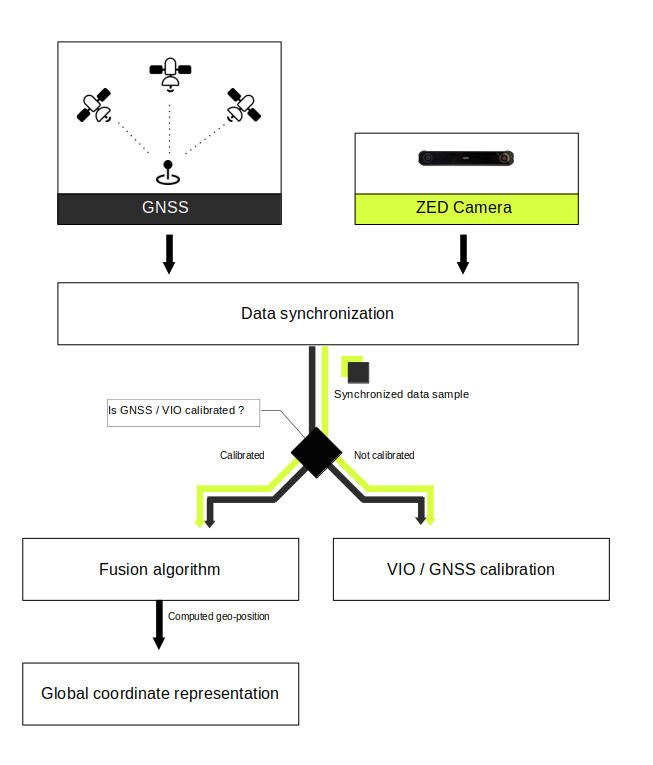
The next figure gives a high-level overview of the sensor fusion algorithm. More details and explanations are provided in dedicated subsections.
Data synchronization
ZED cameras, IMU, and GNSS are distinct sensors operating at different acquisition frequencies and timestamps. Fusing them requires data captured at a simultaneous time. Unfortunately, most of the time this is not the case. ZED cameras provide data at a rate of 15 to 120 frames per second, GNSS typically returns data at a frequency of 1Hz, while IMU can stream data at 400 Hz.
This is why we need data synchronization between camera and GNSS. This block aims to provide well-synchronized ZED camera and GNSS data to the fusion algorithm, allowing fusion between these sensors. More documentation is available here.
VIO / GNSS calibration
Initially, VIO and GNSS trajectories are not aligned when the application starts. Aligning these two is crucial for sensor fusion, so we need to calibrate the system during an initialization period after the GNSS fix has been obtained. To speed up the process, we output an initial calibration as soon as limited data is available, and refine this calibration online as the system moves over time. More information is available here.
Sensor Fusion
When VIO and GNSS are aligned, we start fusing visual-inertial data with GNSS. If GNSS drops, VIO takes over during the GNSS outage.
Global Localization Output
While sensor fusion is running, it is possible to retrieve the device’s global position and orientation. You can convert it into different coordinate system formats using the SDK’s conversion functions. The variety of coordinate formats supported by the SDK, along with detailed explanations on conversion, can be found here.
Getting Started
This section provides a brief explanation of how to use the GeoTracking API alongside the ZED SDK API.
Setting Up Visual-Inertial Tracking
To enable global localization tracking, we need to run visual-inertial odometry first on the camera. Start by opening the ZED camera to access both image and IMU data:
Next, enable the positional tracking module:
For precise tracking, set a Region of Interest (ROI) if certain areas of your ZED camera remain static during tracking (e.g. part of a vehicle is present in the field of view of the camera):
Now that positional tracking is running, send the VIO data to the Sensor Fusion module with the startPublishing function:
Setting Up Global Positional Tracking
Once the ZED SDK starts publishing data, set up the Fusion object:
Subscribe to the data published by the ZED camera:
Set the calibration parameters for GNSS/VIO:
Enable Fusion positional tracking:
Retrieving Fused Data
Start a loop to continuously retrieve and process fused data:
Complete samples
To help you get started, we provide Global localization samples on our GitHub repository. These samples allow you to view live fused GNSS global data, record GNSS sequences, and even replay them for testing purposes.
Troubleshooting
Help with common troubleshooting issues is available here.