

Adding Video Capture in ROS
The ZED ROS Wrapper packages are no longer maintained because ROS 1 reached end-of-life (EOL) on 2025-05-31 with the final Noetic release.
We recommend upgrading to ROS 2 to take advantage of the latest ZED SDK features for robotics applications.
Video with RViz
In this tutorial, you will learn in detail how to configure your own RViz session to see only the video data that you require.
To visualize the video stream published by the ZED node, you can use two different plugins:
Camera: Displays an image from a camera, with the visualized world rendered behind itImage: Displays an image from a topic of typesensor_msgs/Image
Camera
The Camera plugin allows you to visualize an image from a topic of type sensor_msgs/Image. It acts as if the source of the image is placed on its virtual frame and renders all virtual objects in front of it.
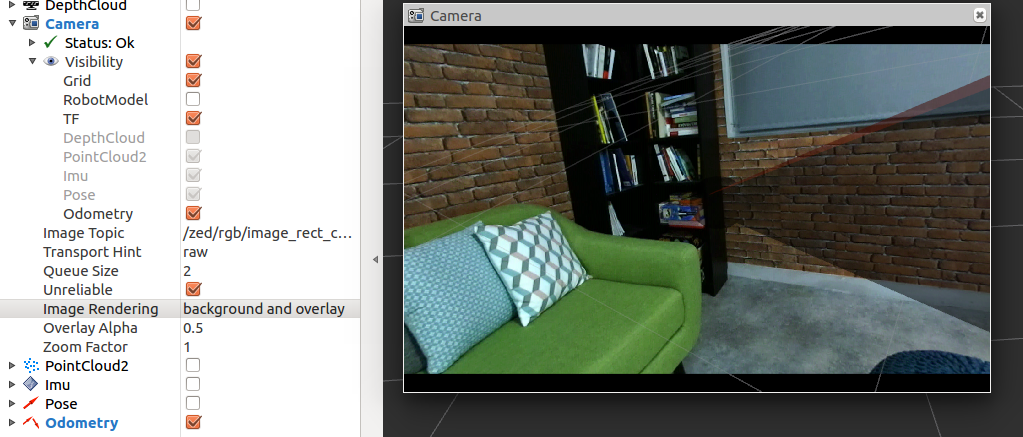
Key parameters:
Image topic: Selects the image topic to visualize from the list of available images in the combo boxTransport hint: Selects the type of compression from the list. Using a compressed image allows reducing the required bandwidth if the image is transmitted to another machine over the ROS networkQueue size: The size of the message queue. Use a lower value to reduce latencyUnreliable: Enables using the UDP network protocol instead of the default TCP protocol in order to reduce latency
By expanding Visibility, you can select/deselect what will be visible in the camera view. Only active plugins can be selected.
Image
The Image plugin allows you to visualize an image from a topic of type sensor_msgs/Image.
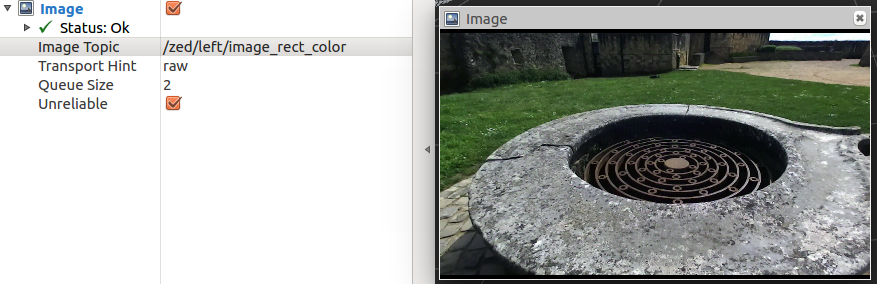
Key parameters:
Image topic: Selects the image topic to visualize from the list of available images in the combo boxTransport hint: Selects the type of compression from the list. Using a compressed image allows reducing the required bandwidth if the image is transmitted to another machine over the ROS networkQueue size: The size of the message queue. Use a lower value to reduce latencyUnreliable: Enables using the UDP network protocol instead of the default TCP protocol in order to reduce latency
Video subscribing in C++
In this tutorial, you will learn how to write a simple C++ node that subscribes to messages of type
sensor_msgs/Image. This lets you retrieve the Left and Right rectified images published by the ZED node.
Introduction
Use this command to connect the ZED camera to the ROS network:
- ZED:
- ZED-M:
- ZED2:
- ZED2i:
The ZED node will start to publish image data in the network only if there is another node that subscribes to the relative topic.
Running the tutorial
If you properly followed the ROS Installation Guide, the executable of this tutorial has been compiled and you can run the subscriber node using this command:
If the ZED node is running and a camera is connected or you have loaded an SVO file, you will receive the following stream of messages confirming that you have correctly subscribed to the ZED image topics:
The code
The source code of the subscriber node zed_video_sub_tutorial.cpp:
The code explained
The following is a brief explanation of the source code above:
These callbacks are executed when the subscriber node receives a message of type sensor_msgs/Image that matches the subscribed topic.
The parameter of the callback is a boost::shared_ptr to the received message. This means you don’t have to worry
about memory management.
The callback code is very simple and demonstrates how to access the fields in a message;
in this case, the height and width of the image.
The main function is very standard and is explained in detail in the “Talker/Listener” ROS tutorial.
The most important lesson of the above code is how the subscribers are defined:
A ros::Subscriber is a ROS object that listens on the network and waits for its own topic message to be available.
When a message is received, it executes the callback assigned to it.
We declared two subscribers: one for the left rectified image and one for the right rectified image.
- The subscriber to the
/zed/zed_node/right/image_rect_colortopic calls theimageRightRectCallbackfunction when it receives a message of typesensor_msgs/Imagethat matches that topic - The subscriber to the
/zed/zed_node/left/image_rect_colortopic calls theimageLeftRectCallbackfunction when it receives a message of typesensor_msgs/Imagethat matches that topic
Conclusion
The full source code of this tutorial is available on GitHub in the zed_video_sub_tutorial sub-package.
Along with the node source code are the package.xml and CMakeLists.txt files that complete the tutorial package.