

How to Export a YOLO Model to ONNX for ZED Custom Object Detection
Introduction
This page shows you how to export a YOLO model to an ONNX file for use with the ZED YOLO TensorRT inference example, or with the CUSTOM_YOLOLIKE_BOX_OBJECTS mode in the native ZED SDK Object Detection module.
This lets you train your own model using Ultralytics YOLO (v5, v8, v10, v11, v12, and YOLO26), YOLOv6, or YOLOv7.
You can also use the default model trained on the COCO dataset (80 classes) provided by the framework maintainers, or train a custom detector with the same architecture. The following tutorials walk you through the process of training a custom detector:
- YOLOv6: https://github.com/meituan/YOLOv6/blob/main/docs/Train_custom_data.md
- YOLOv5: https://github.com/ultralytics/yolov5/wiki/Train-Custom-Data
- Ultralytics (YOLOv8 and later): https://docs.ultralytics.com/modes/train/
It enables the use of ZED 3D cameras with YOLO object detection, adding 3D localization and tracking to the most recent YOLO models using your own classes.
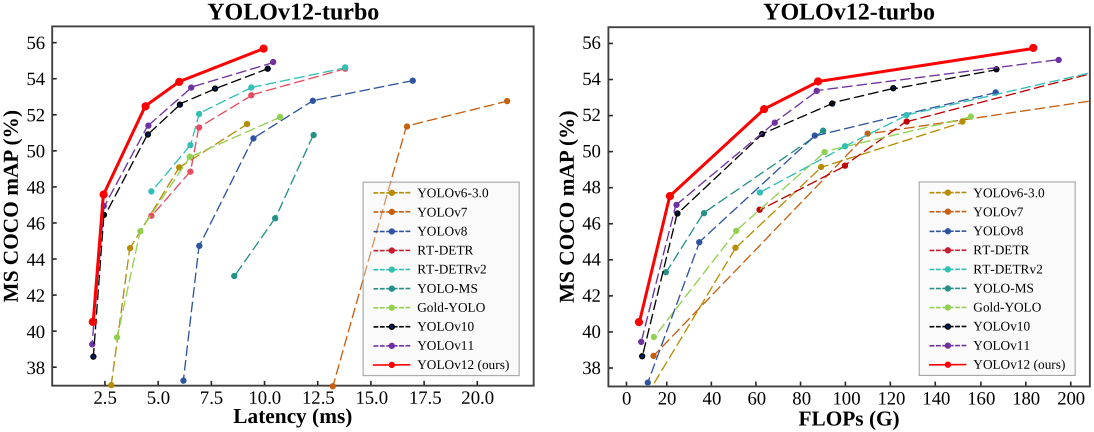
YOLO Comparison in terms of latency-accuracy (left) and FLOPs-accuracy (right) trade-offs (from YOLOv12)
Workflow
The process is as follows:
- Train your model or use an existing state-of-the-art (SOTA) model.
- Export it into an ONNX file.
- Load the ONNX file into the SDK or sample to generate an optimized model. This process uses the TensorRT framework to run inference and requires an initial step of inference engine generation.
ZED SDK samples are available on GitHub:
Keep track of the input resolution (imgsz) used at export time: when loading the model with the native CUSTOM_YOLOLIKE_BOX_OBJECTS mode, set ObjectDetectionParameters::custom_onnx_dynamic_input_shape to the same value. The input size must be a multiple of 32 (e.g. 608 or 640).
Ultralytics YOLO (v5, v8, v10, v11, v12, and YOLO26)
Installing ultralytics
ultralytics can be installed directly from pip using the following command:
ONNX file export
In this documentation, we use the Ultralytics CLI for export. See the export mode documentation for the full list of options.
YOLO26
YOLO26 requires a recent ultralytics release (the 8.4.x series or newer). Older versions do not recognize the yolo26 model name. Upgrade with python -m pip install -U ultralytics if needed.
YOLOv12
YOLOv11
YOLOv10
YOLOv8
YOLOv5
Variants
For each model, the variant (n, s, m, l, x) can be selected, for example:
Dynamic size
The model can also use dynamic dimensions:
Custom model
For a custom model, simply change the weight file:
Please refer to the corresponding documentation for more details https://github.com/ultralytics/ultralytics
YOLOv6
The sample was mainly tested with YOLOv6 v3.0 but should work with other versions with minor or no modifications.
Installing yolov6
YOLOv6 can be installed by cloning the repository and installing its requirements:
ONNX file export
For a custom model, simply change the weight file:
Please refer to the corresponding documentation for more details https://github.com/meituan/YOLOv6/tree/main/deploy/ONNX
YOLOv7
Installing yolov7
YOLOv7 can be installed by cloning the repository and installing its requirements:
ONNX file export
In this documentation, we’ll use the export script export.py
The --end2end option must NOT be used to run the inference with the ZED SDK for compatibility reasons.
For a custom model, simply change the weight file:
Please refer to the corresponding documentation for more details https://github.com/WongKinYiu/yolov7/tree/main?tab=readme-ov-file#export
YOLOv5
Installing yolov5
YOLOv5 can be installed by cloning the repository and installing its requirements:
ONNX file export
For a custom model, simply change the weight file:
Please refer to the corresponding documentation for more details https://docs.ultralytics.com/yolov5/.