NewsTutorials
Nov 17, 2015.Stereo Video Passthrough for Oculus Rift
You will learn in this tutorial how to enable 3D video passthrough in Oculus Rift with the ZED camera.
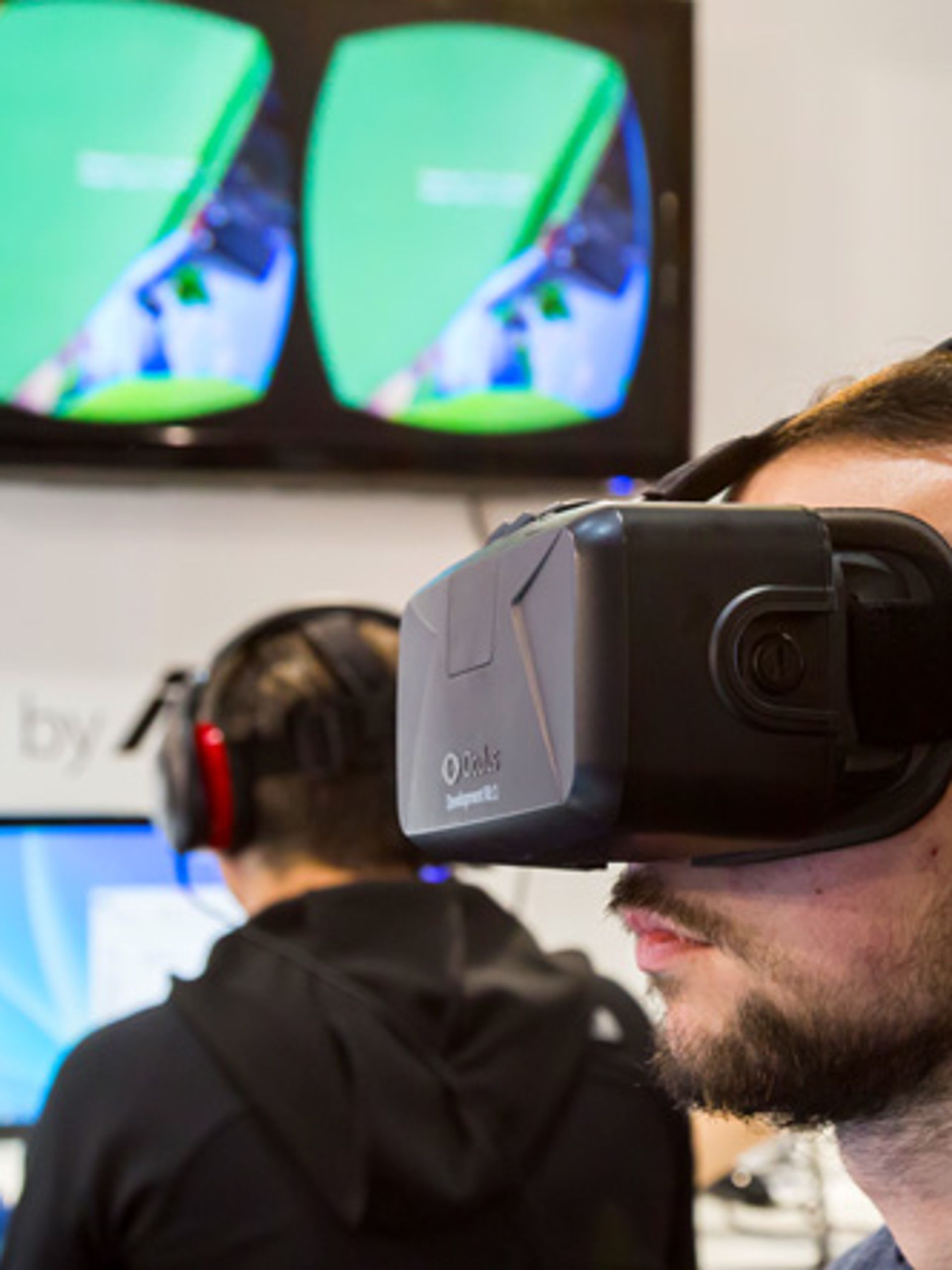
You will learn in this tutorial how to enable 3D video passthrough in Oculus Rift with the ZED camera.
Note: This is for ZED SDK 1.0 only. Please see the latest SDK guides and documentation here.
You will learn in this tutorial how to enable 3D video passthrough in Oculus Rift with the ZED camera. The ZED is a USB 3.0 stereo camera with high resolution, high frame rate, wide field of view and low latency output, which is ideal for video passthrough in VR.
This tutorial has been written for Oculus SDK 0.8, but works with newer versions. You can download the complete source code for this project on our GitHub page.
To generate the project, use CMake as described in the documentation.
Don’t forget to:
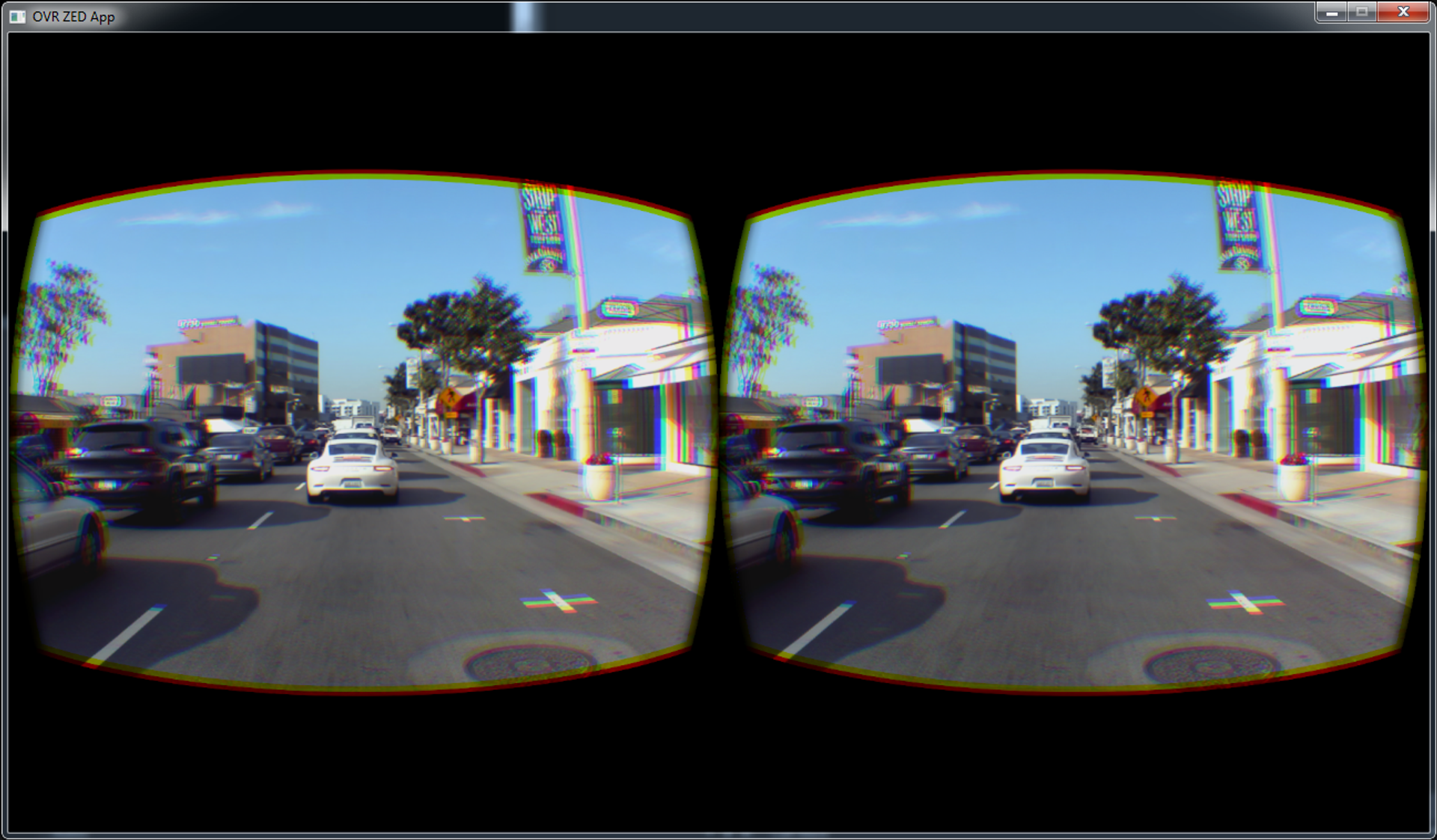
In this example, we will capture and render ZED images to the Oculus Rift DK2. An SDL window will be created on the desktop monitor to mirror the Rift’s view. The ZED images will be adjusted to improve stereo visual comfort and match the Rift display resolution and FOV.
Let’s break down the code piece by piece.
We create a main C++ file and include standard headers for I/O, SDL2, ZED (Camera.hpp) and Oculus (core, CAPI and CAPI GL). To keep the code clean, we manage OpenGL shaders within an external class named Shader.
#include <iostream>
#include <Windows.h>
#include <GL/glew.h>
#include <stddef.h>

#include <SDL.h>
#include <SDL_syswm.h>

#include <OVR.h>
#include <OVR_CAPI.h>
#include <OVR_CAPI_GL.h>

#include <zed/Camera.hpp>

#include "Shader.hpp"

int main(int argc, char** argv)
{
}
Then we define a constant variable:
#define MAX_FPS 75
This variable is used to set a maximum limit to the number of frames rendered per second. Oculus recommends to develop 75 FPS applications for a better experience: “This is one of the reasons it is so critical to run at 75fps v-synced, unbuffered.”
So we set the maximum frame rate to 75. The ZED camera can output stereo video at 60 FPS in HD720 and up to 100 FPS in VGA.
Then we create two global GLchar* variables that contain the source code for the vertex shader and the fragment shader.
GLchar* OVR_ZED_VS =
	"#version 330 core
	layout(location=0) in vec3 in_vertex;
	layout(location=1) in vec2 in_texCoord;
	uniform float hit;
	out vec2 b_coordTexture;
	void main()
	{
		b_coordTexture = in_texCoord;
		gl_Position = vec4(in_vertex.x - hit, in_vertex.y, in_vertex.z,1);
	}";
GLchar* OVR_ZED_FS =
	"#version 330 core
	uniform sampler2D u_textureZED;
	in vec2 b_coordTexture;
	out vec4 out_color;
	void main()
	{
		out_color = vec4(texture(u_textureZED, b_coordTexture).rgb,1);
	}";
The shader above is a simple 2D texture shader. The only difference is the hit uniform variable. It is used to translate the texture on the X axis. We will explain how we use this variable later in this tutorial.
In this section, we initialize SDL2, Oculus and OpenGL contexts.
// Initialize SDL2 context
SDL_Init(SDL_INIT_VIDEO);
// Initialize Oculus context
ovrResult result = ovr_Initialize(nullptr);
if (OVR_FAILURE(result))
{
	std::cout << "ERROR: Failed to initialize libOVR" << std::endl;
	SDL_Quit();
	return -1;
}

ovrSession hmd;
ovrGraphicsLuid luid;
// Connect to the Oculus headset
result = ovr_Create(&hmd, &luid);
if (OVR_FAILURE(result))
{
	std::cout << "ERROR: Oculus Rift not detected" << std::endl;
	ovr_Shutdown();
	SDL_Quit();
	return -1;
}

int x = SDL_WINDOWPOS_CENTERED, y = SDL_WINDOWPOS_CENTERED;
int winWidth = 1280;
int winHeight = 720;
Uint32 flags = SDL_WINDOW_OPENGL | SDL_WINDOW_SHOWN;
// Create SDL2 Window
SDL_Window* window = SDL_CreateWindow("OVR ZED App", x, y, winWidth, winHeight, flags);
// Create OpenGL context
SDL_GLContext glContext = SDL_GL_CreateContext(window);
// Initialize GLEW
glewInit();
// Turn off vsync to let the compositor do its magic
SDL_GL_SetSwapInterval(0);We create and initialize the ZED camera.
// Initialize the ZED Camera
sl::zed::Camera* zed = 0;
zed = new sl::zed::Camera(sl::zed::HD720);
sl::zed::ERRCODE zederr = zed->init(sl::zed::MODE::PERFORMANCE, 0);
int zedWidth = zed->getImageSize().width;
int zedHeight = zed->getImageSize().height;
if (zederr != sl::zed::SUCCESS)
{
	std::cout << "ERROR: " << sl::zed::errcode2str(zederr) << std::endl;
	ovr_Destroy(hmd);
	ovr_Shutdown();
	SDL_GL_DeleteContext(glContext);
	SDL_DestroyWindow(window);
	SDL_Quit();
	delete zed;
	return -1;
}
We initialize two OpenGL textures for the left and right images of the ZED.
GLuint zedTextureID_L, zedTextureID_R;
// Generate OpenGL texture for left images of the ZED camera
glGenTextures(1, &zedTextureID_L);
glBindTexture(GL_TEXTURE_2D, zedTextureID_L);
glTexImage2D(GL_TEXTURE_2D, 0, GL_RGBA, zedWidth, zedHeight, 0, GL_BGRA, GL_UNSIGNED_BYTE, NULL);
glTexParameteri(GL_TEXTURE_2D, GL_TEXTURE_MAG_FILTER, GL_LINEAR);
glTexParameteri(GL_TEXTURE_2D, GL_TEXTURE_MIN_FILTER, GL_NEAREST);
glTexParameteri(GL_TEXTURE_2D, GL_TEXTURE_WRAP_S, GL_REPEAT);
glTexParameteri(GL_TEXTURE_2D, GL_TEXTURE_WRAP_T, GL_REPEAT);
// Generate OpenGL texture for right images of the ZED camera
glGenTextures(1, &zedTextureID_R);
glBindTexture(GL_TEXTURE_2D, zedTextureID_R);
glTexImage2D(GL_TEXTURE_2D, 0, GL_RGBA, zedWidth, zedHeight, 0, GL_BGRA, GL_UNSIGNED_BYTE, NULL);
glTexParameteri(GL_TEXTURE_2D, GL_TEXTURE_MAG_FILTER, GL_LINEAR);
glTexParameteri(GL_TEXTURE_2D, GL_TEXTURE_MIN_FILTER, GL_NEAREST);
glTexParameteri(GL_TEXTURE_2D, GL_TEXTURE_WRAP_S, GL_REPEAT);
glTexParameteri(GL_TEXTURE_2D, GL_TEXTURE_WRAP_T, GL_REPEAT);
glBindTexture(GL_TEXTURE_2D, 0);
For more information about Oculus swap texture set, please read the Swap Texture Set Initialization section in the Oculus documentation here.
ovrHmdDesc hmdDesc = ovr_GetHmdDesc(hmd);
// Get the texture sizes of Oculus eyes
ovrSizei textureSize0 = ovr_GetFovTextureSize(hmd, ovrEye_Left, hmdDesc.DefaultEyeFov[0], 1.0f);
ovrSizei textureSize1 = ovr_GetFovTextureSize(hmd, ovrEye_Right, hmdDesc.DefaultEyeFov[1], 1.0f);
// Compute the final size of the render buffer
ovrSizei bufferSize;
bufferSize.w = textureSize0.w + textureSize1.w;
bufferSize.h = std::max(textureSize0.h, textureSize1.h);
// Initialize OpenGL swap textures to render
ovrSwapTextureSet* ptextureSet = 0;
if (OVR_SUCCESS(ovr_CreateSwapTextureSetGL(hmd, GL_SRGB8_ALPHA8, bufferSize.w, bufferSize.h, &ptextureSet)))
{
	for (int i = 0; i < ptextureSet->TextureCount; ++i)
	{
		ovrGLTexture* tex = (ovrGLTexture*)&ptextureSet->Textures[i];
		glBindTexture(GL_TEXTURE_2D, tex->OGL.TexId);
		glTexParameteri(GL_TEXTURE_2D, GL_TEXTURE_MIN_FILTER, GL_LINEAR);
		glTexParameteri(GL_TEXTURE_2D, GL_TEXTURE_MAG_FILTER, GL_LINEAR);
		glTexParameteri(GL_TEXTURE_2D, GL_TEXTURE_WRAP_S, GL_CLAMP_TO_EDGE);
		glTexParameteri(GL_TEXTURE_2D, GL_TEXTURE_WRAP_T, GL_CLAMP_TO_EDGE);
	}
}
else
{
	std::cout << "ERROR: failed creating swap texture" << std::endl;
	ovr_Destroy(hmd);
	ovr_Shutdown();
	SDL_GL_DeleteContext(glContext);
	SDL_DestroyWindow(window);
	SDL_Quit();
	delete zed;
	return -1;
}
// Generate frame buffer to render
GLuint fboID;
glGenFramebuffers(1, &fboID);
// Generate depth buffer of the frame buffer
GLuint depthBuffID;
glGenTextures(1, &depthBuffID);
glBindTexture(GL_TEXTURE_2D, depthBuffID);
glTexParameteri(GL_TEXTURE_2D, GL_TEXTURE_MIN_FILTER, GL_LINEAR);
glTexParameteri(GL_TEXTURE_2D, GL_TEXTURE_MAG_FILTER, GL_LINEAR);
glTexParameteri(GL_TEXTURE_2D, GL_TEXTURE_WRAP_S, GL_CLAMP_TO_EDGE);
glTexParameteri(GL_TEXTURE_2D, GL_TEXTURE_WRAP_T, GL_CLAMP_TO_EDGE);
GLenum internalFormat = GL_DEPTH_COMPONENT24;
GLenum type = GL_UNSIGNED_INT;
glTexImage2D(GL_TEXTURE_2D, 0, internalFormat, bufferSize.w, bufferSize.h, 0, GL_DEPTH_COMPONENT, type, NULL);To display the render result in our SDL2 window, we must create a mirror frame buffer. Oculus SDK can link the render result to a mirror frame buffer for us.
// Create a mirror texture to display the render result in the SDL2 window
ovrGLTexture* mirrorTexture = nullptr;
result = ovr_CreateMirrorTextureGL(hmd, GL_SRGB8_ALPHA8, winWidth, winHeight, reinterpret_cast<ovrTexture**>(&mirrorTexture));
if (!OVR_SUCCESS(result))
{
	std::cout << "ERROR: Failed to create mirror texture" << std::endl;
}
GLuint mirrorFBOID;
glGenFramebuffers(1, &mirrorFBOID);
glBindFramebuffer(GL_READ_FRAMEBUFFER, mirrorFBOID);
glFramebufferTexture2D(GL_READ_FRAMEBUFFER, GL_COLOR_ATTACHMENT0, GL_TEXTURE_2D, mirrorTexture->OGL.TexId, 0);
glFramebufferRenderbuffer(GL_READ_FRAMEBUFFER, GL_DEPTH_ATTACHMENT, GL_RENDERBUFFER, 0);
glBindFramebuffer(GL_READ_FRAMEBUFFER, 0);Here we configure the variables used by the Oculus compositor. As we disable the headset tracking, we set default values.
ovrLayerEyeFov ld;
ld.Header.Type = ovrLayerType_EyeFov;
// Tell to the Oculus compositor that our texture origin is at the bottom left
ld.Header.Flags = ovrLayerFlag_TextureOriginAtBottomLeft | ovrLayerFlag_HeadLocked;   // Because OpenGL | Disable head tracking
// Set the Oculus layer eye field of view for each view
for (int eye = 0; eye < 2; ++eye)
{
	// Set the color texture as the current swap texture
	ld.ColorTexture[eye] = ptextureSet;
	// Set the viewport as the right or left vertical half part of the color texture
	ld.Viewport[eye] = OVR::Recti(eye == ovrEye_Left ? 0 : bufferSize.w / 2, 0, bufferSize.w / 2, bufferSize.h);
	// Set the field of view
	ld.Fov[eye] = hmdDesc.DefaultEyeFov[eye];
	// Set the pose matrix
	ld.RenderPose[eye] = eyeRenderPose;
}
double sensorSampleTime = ovr_GetTimeInSeconds();
ld.SensorSampleTime = sensorSampleTime;

// Get the render description of the left and right "eyes" of the Oculus headset
ovrEyeRenderDesc eyeRenderDesc[2];
eyeRenderDesc[0] = ovr_GetRenderDesc(hmd, ovrEye_Left, hmdDesc.DefaultEyeFov[0]);
eyeRenderDesc[1] = ovr_GetRenderDesc(hmd, ovrEye_Right, hmdDesc.DefaultEyeFov[1]);
// Get the Oculus view scale description
ovrVector3f viewOffset[2] = { eyeRenderDesc[0].HmdToEyeViewOffset, eyeRenderDesc[1].HmdToEyeViewOffset };
ovrViewScaleDesc viewScaleDesc;
viewScaleDesc.HmdSpaceToWorldScaleInMeters = 1.0f;
viewScaleDesc.HmdToEyeViewOffset[0] = viewOffset[0];
viewScaleDesc.HmdToEyeViewOffset[1] = viewOffset[1];We create and compile our shader.
// Create and compile the shader's sources
Shader shader(OVR_ZED_VS, OVR_ZED_FS);
This step is important. We need to crop ZED images to match the Rift display resolution and FOV.
The DK2 Rift has a display resolution of 1920 x 1080. In order to preserve the viewing experience, each eye requires a rendered image that is larger than 960 x 1080 resolution. Also, frame rate needs to be greater than 60 FPS.
In our case, we select the 720p60 mode of the ZED camera, which is the closest match to the Rift ideal viewing specifications. In this mode, the horizontal field of view is 90°, which is the same as the display FOV of the Rift. Vertical FOV of the ZED is lower than the Rift, so black bars will be added on top and bottom of the visible image.
Note that both the ZED and the Oculus Rift cFOV and dFOV (camera and display FOV) can vary slightly, so we’re going to automatically crop ZED images if their horizontal FOV exceeds Rift’s one.
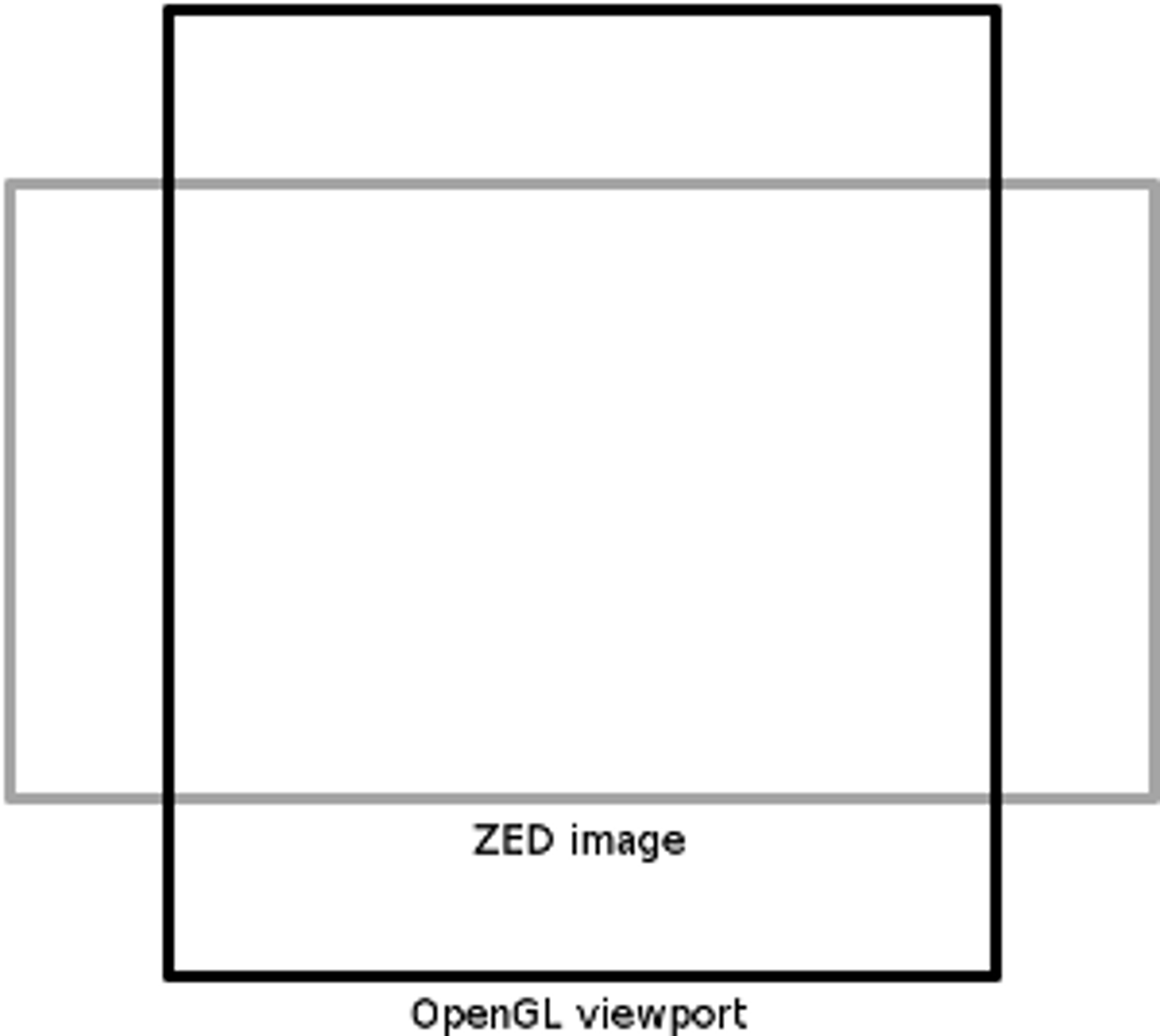
To crop ZED images, we first compute the coordinates of the common field of view.
// Compute the ZED image field of view with the ZED parameters
float zedFovH = atanf(zed->getImageSize().width / (zed->getParameters()->LeftCam.fx * 2.f)) * 2.f;

// Compute the Oculus' field of view with its parameters
float ovrFovH = (atanf(hmdDesc.DefaultEyeFov[0].LeftTan) + atanf(hmdDesc.DefaultEyeFov[0].RightTan));

// Compute the useful part of the ZED image
unsigned int usefulWidth = zed->getImageSize().width * ovrFovH / zedFovH;
// Compute the size of the final image displayed in the headset with the ZED image's aspect-ratio kept
unsigned int widthFinal = bufferSize.w / 2; unsigned int heightFinal = zed->getImageSize().height * widthFinal / usefulWidth;
// Convert this size to OpenGL viewport's frame's coordinates
float heightGL = (heightFinal) / (float)(bufferSize.h);
float widthGL = ((zed->getImageSize().width * (heightFinal / (float)zed->getImageSize().height)) / (float)widthFinal);
Next, we create an OpenGL rectangle with the ROI coordinates computed above.
// Create a rectangle with the coordonates computed and push it in GPU memory.
float rectVertices[12] = { -widthGL, -heightGL, 0, widthGL, -heightGL, 0, widthGL, heightGL, 0, -widthGL, heightGL, 0 };
GLuint rectVBO[3];
glGenBuffers(1, &rectVBO[0]);
glBindBuffer(GL_ARRAY_BUFFER, rectVBO[0]);
glBufferData(GL_ARRAY_BUFFER, sizeof(rectVertices), rectVertices, GL_STATIC_DRAW);

float rectTexCoord[8] = { 0, 1, 1, 1, 1, 0, 0, 0 };
glGenBuffers(1, &rectVBO[1]);
glBindBuffer(GL_ARRAY_BUFFER, rectVBO[1]);
glBufferData(GL_ARRAY_BUFFER, sizeof(rectTexCoord), rectTexCoord, GL_STATIC_DRAW);

unsigned int rectIndices[6] = { 0, 1, 2, 0, 2, 3 };
glGenBuffers(1, &rectVBO[2]);
glBindBuffer(GL_ELEMENT_ARRAY_BUFFER, rectVBO[2]);
glBufferData(GL_ELEMENT_ARRAY_BUFFER, sizeof(rectIndices), rectIndices, GL_STATIC_DRAW);

glBindBuffer(GL_ELEMENT_ARRAY_BUFFER, 0);
glBindBuffer(GL_ARRAY_BUFFER, 0);Now that we have the right format for our stereo images, let’s create the render loop that will display the images in the Rift.
First we create and initialize variables that will be useful during runtime.
// Initialize hit value
float hit = 0.02f;
// Initialize a boolean that will be used to stop the application’s loop and another one to pause/unpause rendering
bool end = false;
bool refresh = true;
// SDL variable that will be used to store input events
SDL_Event events;
// Initialize time variables. They will be used to limit the number of frames rendered per second.
int time1 = 0, timePerFrame = 0;
int frameRate = (int)(1000 / MAX_FPS);
>Next we tell OpenGL to use our shader for rendering. We use the Shader class’ attributes. It automatically links our shader’s in_vertex and in_texCoord variablesto OpenGL. Also, it keeps their OpenGL reference respectively in Shader::ATTRIB_VERTICES_POS and Shader::ATTRIB_TEXTURE2D_POS variables.
// Enable the shader
glUseProgram(shader.getProgramId());
// Bind the Vertex Buffer Objects of the rectangle that displays ZED images
// vertices
glEnableVertexAttribArray(Shader::ATTRIB_VERTICES_POS);
glBindBuffer(GL_ARRAY_BUFFER, rectVBO[0]);
glVertexAttribPointer(Shader::ATTRIB_VERTICES_POS, 3, GL_FLOAT, GL_FALSE, 0, 0);
// indices
glBindBuffer(GL_ELEMENT_ARRAY_BUFFER, rectVBO[2]);
// texture coordinates
glEnableVertexAttribArray(Shader::ATTRIB_TEXTURE2D_POS);
glBindBuffer(GL_ARRAY_BUFFER, rectVBO[1]);
glVertexAttribPointer(Shader::ATTRIB_TEXTURE2D_POS, 2, GL_FLOAT, GL_FALSE, 0, 0);
Then, we create a while loop that tests if end is true. If yes, the loop stops and the application quits properly.
// Main loop
while (!end)
{
     // code...
}
// Disable all OpenGL buffer
glDisableVertexAttribArray(Shader::ATTRIB_TEXTURE2D_POS);
glDisableVertexAttribArray(Shader::ATTRIB_VERTICES_POS);
glBindBuffer(GL_ELEMENT_ARRAY_BUFFER, 0);
glBindBuffer(GL_ARRAY_BUFFER, 0);
glBindTexture(GL_TEXTURE_2D, 0);
glUseProgram(0);
glBindVertexArray(0);
// Delete the Vertex Buffer Objects of the rectangle
glDeleteBuffers(3, rectVBO);
// Delete SDL, OpenGL, Oculus and ZED context
ovr_DestroySwapTextureSet(hmd, ptextureSet);
ovr_DestroyMirrorTexture(hmd, &mirrorTexture->Texture);
ovr_Destroy(hmd);
ovr_Shutdown();
SDL_GL_DeleteContext(glContext);
SDL_DestroyWindow(window);
SDL_Quit();
delete zed;
// quit
return 0;During runtime, we need check if the previous frame has been rendered too fast. If it is the case, we pause the render loop to have a FPS value equal or inferior to MAX_FPS. For debug purposes, we also display the FPS value in the console every second. So let’s go back to the while loop and add the following lines.
// Compute the time used to render the previous frame
timePerFrame = SDL_GetTicks() - time1;
// If the previous frame has been rendered too fast
if (timePerFrame < frameRate)
{
	// Pause the loop to have a max FPS equal to MAX_FPS
	SDL_Delay(frameRate - timePerFrame);
	timePerFrame = frameRate;
}
// Frame counter
static unsigned int c = 0;
// Chronometer
static unsigned int time = 0;
// If chronometer reached 1 second
if (time > 1000)
{
	// Display FPS
	std::cout << "FPS: " << c << std::endl;
	// Reset chronometer
	time = 0;
	// Reset frame counter
	c = 0;
}
// Increment the chronometer and the frame counter
time += timePerFrame;
c++;
// Start frame chronometer
time1 = SDL_GetTicks();Now let’s add the following lines to handle input events. This new while loop catches and manages SDL input events, along with keyboard and mouse events:
// While there is an event catched and not tested
while (SDL_PollEvent(&events))
{
	// If a key is released
	if (events.type == SDL_KEYUP)
	{
		// If Q quit the application
		if (events.key.keysym.scancode == SDL_SCANCODE_Q)
			end = true;
		// If R reset the hit value
		else if (events.key.keysym.scancode == SDL_SCANCODE_R)
			hit = 0.0f;
		// If C pause/unpause rendering
		else if (events.key.keysym.scancode == SDL_SCANCODE_C)
			refresh = !refresh;
	}
	// If the mouse wheel is used
	if (events.type == SDL_MOUSEWHEEL)
	{
		// Increase or decrease hit value
		float s;
		events.wheel.y > 0 ? s = 1.0f : s = -1.0f;
		hit += 0.005f * s;
	}
}Let’s add this following if condition.
// If rendering is unpaused and
// successful grab ZED image
if (refresh && !zed->grab(sl::zed::SENSING_MODE::RAW, false, false))
{
}
If this condition is true, we bind the frame buffer.
// Increment the CurrentIndex to point to the next texture within the output swap texture set.
// CurrentIndex must be advanced round-robin fashion every time we draw a new frame
ptextureSet->CurrentIndex = (ptextureSet->CurrentIndex + 1) % ptextureSet->TextureCount;
// Get the current swap texture pointer
auto tex = reinterpret_cast<ovrGLTexture*>(&ptextureSet->Textures[ptextureSet->CurrentIndex]);
// Bind the frame buffer
glBindFramebuffer(GL_FRAMEBUFFER, fboID);
// Set its color layer 0 as the current swap texture
glFramebufferTexture2D(GL_FRAMEBUFFER, GL_COLOR_ATTACHMENT0, GL_TEXTURE_2D, tex->OGL.TexId, 0);
// Set its depth layer as our depth buffer
glFramebufferTexture2D(GL_FRAMEBUFFER, GL_DEPTH_ATTACHMENT, GL_TEXTURE_2D, depthBuffID, 0);
// Clear the frame buffer
glClear(GL_COLOR_BUFFER_BIT | GL_DEPTH_BUFFER_BIT);
glClearColor(0, 0, 0, 1);
Now, for each eye, we render the corresponding left and right image.
// Render for each Oculus eye the equivalent ZED image
for (int eye = 0; eye &amp;amp;amp;lt; 2; eye++)
{
// Set the left or right vertical half of the buffer as the viewport
glViewport(eye == ovrEye_Left ? 0 : bufferSize.w / 2, 0, bufferSize.w / 2, bufferSize.h);
// Bind the left or right ZED image
glBindTexture(GL_TEXTURE_2D, eye == ovrEye_Left ? zedTextureID_L : zedTextureID_R);
glTexImage2D(GL_TEXTURE_2D, 0, GL_RGBA, zedWidth, zedHeight, 0, GL_BGRA, GL_UNSIGNED_BYTE, zed->retrieveImage(eye == ovrEye_Left ? sl::zed::SIDE::LEFT : sl::zed::SIDE::RIGHT).data);
// Bind the hit value
glUniform1f(glGetUniformLocation(shader.getProgramId(), "hit"), eye == ovrEye_Left ? hit : -hit);
// Draw the ZED image
glDrawElements(GL_TRIANGLES, 6, GL_UNSIGNED_INT, 0);
}Note: To keep this tutorial as simple as possible, the code provided here is not optimized for latency. To reduce latency, we recommend using CUDA-OpenGL interop which avoids unnecessary buffer transfers between CPU and GPU memory. A sample code “OpenGL GPU interop” is available in the ZED SDK.
To maintain visual comfort in stereo VR, there are several rules that need to be respected:
There are also other rules, but they have a lower impact on visual comfort. Here, the first two rules are automatically respected when using the ZED SDK. The ZED SDK analyzes and corrects any mismatch between the two cameras in terms of distortion, alignment, and color. So we just need to add to our code a last modification to maintain our depth range within a reasonable budget.
Since the ZED camera has a baseline superior to 6cm, objects seen close to the camera will induce eye strain and visual fatigue. Ideally, we would have left the virtual planes parallel and converged on infinity. But in this case, we can reduce eye strain on close objects by adding a virtual convergence to the images, which we call here HIT (horizontal image translation). The hit value is the x value of a translation vector which translates ZED images on the X axis. Here, we set the HIT to 2% of the resolution, which enables us to adjust image translation independently of the selected image resolution. Now please note that adding virtual convergence will make objets far away from the camera to become uncomfortable. Using HIT to compensate for a large stereo baseline is not an ideal solution, so use this variable with caution.
Lastly, we submit the frame to the Oculus headset after the if(refresh) block. Even if we don’t ask to refresh the framebuffer or if the Camera::grab() doesn’t catch a new frame, we have to submit an image to the Rift; it needs 75Hz refresh. Else there will be jumbs, black frames and/or glitches in the headset.
} // if (refresh)
ovrLayerHeader* layers = &ld.Header;
// Submit the frame to the Oculus compositor
// which will display the frame in the Oculus headset
result = ovr_SubmitFrame(hmd, 0, &viewScaleDesc, &layers, 1);
if (!OVR_SUCCESS(result))
{
	std::cout << "ERROR: failed to submit frame" << std::endl;
	glDeleteBuffers(3, rectVBO);
	ovr_DestroySwapTextureSet(hmd, ptextureSet);
	ovr_DestroyMirrorTexture(hmd, &mirrorTexture->Texture);
	ovr_Destroy(hmd);
	ovr_Shutdown();
	SDL_GL_DeleteContext(glContext);
	SDL_DestroyWindow(window);
	SDL_Quit();
	delete zed;
	return -1;
}Now we’re able to display ZED images in the Rift DK2. But we would also like to see these images on our desktop SDL window. So we copy the frame to the mirror frame buffer.
// Copy the frame to the mirror buffer
// which will be drawn in the SDL2 image
glBindFramebuffer(GL_READ_FRAMEBUFFER, mirrorFBOID);
glBindFramebuffer(GL_DRAW_FRAMEBUFFER, 0);
GLint w = mirrorTexture->OGL.Header.TextureSize.w;
GLint h = mirrorTexture->OGL.Header.TextureSize.h;
glBlitFramebuffer(0, h, w, 0,
			0, 0, w, h,
			GL_COLOR_BUFFER_BIT, GL_NEAREST);
glBindFramebuffer(GL_READ_FRAMEBUFFER, 0);
// Swap the SDL2 window
SDL_GL_SwapWindow(window);
Run the application and enjoy.