


Classes | |
| struct | Timestamp |
| Structure representing timestamps with utilities. More... | |
| struct | SensorsData |
| Structure containing all sensors data (except image sensors) to be used for positional tracking or environment study. More... | |
| struct | SensorsData::BarometerData |
| Structure containing data from the barometer sensor. More... | |
| struct | SensorsData::TemperatureData |
| Structure containing data from the temperature sensors. More... | |
| struct | SensorsData::MagnetometerData |
| Structure containing data from the magnetometer sensor. More... | |
| struct | SensorsData::IMUData |
| Structure containing data from the IMU sensor. More... | |
| struct | CameraOneConfiguration |
| Structure containing information about the camera sensor. More... | |
| struct | CameraOneInformation |
| Structure containing information of a single camera (serial number, model, input type, etc.). More... | |
| class | String |
| Class defining a string. More... | |
| struct | Resolution |
| Structure containing the width and height of an image. More... | |
| class | Rect |
| Class defining a 2D rectangle with top-left corner coordinates and width/height in pixels. More... | |
| class | Matrix3f |
| Class representing a generic 3*3 matrix. More... | |
| class | Matrix4f |
| Class representing a generic 4*4 matrix. More... | |
| class | Vector2< T > |
| Class representing a 2-dimensional vector for both CPU and GPU. More... | |
| class | Vector3< T > |
| Class representing a 3-dimensional vector for both CPU and GPU. More... | |
| class | Vector4< T > |
| Class representing a 4-dimensional vector for both CPU and GPU. More... | |
| class | Mat |
| Class representing 1 to 4-channel matrix of float or uchar, stored on CPU and/or GPU side. More... | |
| struct | TensorParameters |
| Structure to define the input options for deep learning inference. More... | |
| class | Tensor |
| Class representing a multi-dimensional array (Tensor), typically used for deep learning inference. More... | |
| struct | SensorParameters |
| Structure containing information about a single sensor available in the current device. More... | |
| struct | SensorsConfiguration |
| Structure containing information about all the sensors available in the current device. More... | |
| struct | CameraConfiguration |
| Structure containing information about the camera sensor. More... | |
| struct | CameraInformation |
| Structure containing information of a single camera (serial number, model, input type, etc.). More... | |
Enumerations | |
| enum class | SENSORS_ERROR_CODE |
| Lists error codes in the Sensors SDK. More... | |
| enum class | UNIT |
| Lists available units for measures. More... | |
| enum class | COORDINATE_SYSTEM |
| Lists available coordinates systems for positional tracking and 3D measures. More... | |
| enum class | ERROR_CODE |
| Lists error codes in the ZED SDK. More... | |
| enum class | COMPUTE_PREFERENCE |
| Lists how much GPU a module is allowed to use. More... | |
| enum class | LENS_DISTORTION_MODEL |
| Lists the lens distortion models used to describe a camera's optics. More... | |
| enum class | SENSOR_TYPE |
| Lists available sensor types. More... | |
| enum class | SENSORS_UNIT |
| Lists available measurement units of onboard sensors. More... | |
| enum class | MEM |
| Lists available memory type. More... | |
| enum class | COPY_TYPE |
| Lists available copy operation on sl::Mat. More... | |
| enum class | MAT_TYPE |
| Lists available sl::Mat formats. More... | |
| enum class | CAMERA_MOTION_STATE |
| Lists different states of the camera motion. More... | |
| enum class | MODULE |
| Lists available modules. More... | |
Functions | |
| int | getZEDSDKRuntimeVersion (int &major, int &minor, int &patch) |
| Returns the ZED SDK version currently installed on the computer. More... | |
| const void | getZEDSDKBuildVersion (int &major, int &minor, int &patch) |
| Returns the ZED SDK version which the current program has been compiled with. More... | |
| String | toVerbose (const ERROR_CODE &errorCode) |
| Provide a concise sl::ERROR_CODE string. More... | |
| bool | isCameraOne (const sl::MODEL) |
| Check the type of a camera model. More... | |
| void | sleep_ms (int time) |
| Blocks the execution of the current thread for time milliseconds. More... | |
| void | sleep_us (int time) |
| Blocks the execution of the current thread for time microseconds. More... | |
|
strong |
Lists error codes in the Sensors SDK.
| Enumerator | |
|---|---|
| STALE_DATA | In pipelined mode with DROP_STALE sync policy, the retrieved data is too old relative to the sync timestamp. The frame was not returned to avoid using outdated information. |
| GNSS_DATA_NEED_FIX | This is a warning message indicating an issue with the ingestGNSSData function call. The problem lies in the gnss_status field of the GNSSData parameter, which is currently set to UNKNOWN. To enhance the accuracy of the VPS (Visual Positioning System), it is essential to provide an appropriate value for this field. To rectify this issue, please consider setting the gnss_status field to a valid value that reflects the status of your GNSS sensor. If your GNSS sensor is unable to output a status, it is recommended to set the gnss_status field to sl::GNSS_STATUS::SINGLE. |
| INVALID_COVARIANCE | This is a warning message notifying you about an issue encountered while ingesting GNSSData into the Fusion system. The problem lies in the very low covariance value provided. To ensure stability and prevent potential issues, the system will automatically clamp this covariance value. |
| INVALID_TIMESTAMP | You have attempted to ingest GNSSData into the Fusion system with an invalid timestamp. It is essential to ensure that the timestamp of your GNSSData is set correctly. This issue may arise from a unit error in the ingested timestamp, such as providing the timestamp in microseconds instead of nanoseconds. |
| CONFIGURATION_FALLBACK | The operation could not proceed with the target configuration but did success with a fallback. |
| MOTION_SENSORS_DATA_REQUIRED | The input data does not contains the high frequency motion sensors data (IMU), this is usually because it requires newer SVO/Streaming. In order to work this modules needs inertial data present in it input. |
| CORRUPTED_FRAME | The image is corrupted with invalid colors (green/purple images). This indicates a serious hardware or driver issue. |
| SENSOR_REBOOTING | The sensor is currently rebooting. |
| SUCCESS | Standard code for successful behavior. |
| FAILURE | Standard code for unsuccessful behavior. |
| NO_GPU_COMPATIBLE | No GPU found or CUDA capability of the device is not supported. |
| NOT_ENOUGH_GPU_MEMORY | Not enough GPU memory for this depth mode, try a different mode (such as PERFORMANCE), or increase the minimum depth value (see InitParameters::depth_minimum_distance). |
| SENSOR_NOT_DETECTED | No sensor was detected. |
| MOTION_SENSORS_NOT_INITIALIZED | The MCU that controls the motion sensors module (IMU) has an invalid serial number. You can try to recover it by launching the ZED Diagnostic tool from the command line with the option |
| MOTION_SENSORS_NOT_AVAILABLE | A camera with motion sensors is detected but the motion sensors (IMU, barometer, ...) cannot be opened. Only the MODEL::ZED does not have motion sensors. Unplug/replug is required. |
| INVALID_RESOLUTION | In case of invalid resolution parameter, such as an upsize beyond the original image size in Camera::retrieveImage. |
| LOW_USB_BANDWIDTH | Insufficient bandwidth for the correct use of the camera. This issue can occur when you use multiple cameras or a USB 2.0 port. |
| CALIBRATION_FILE_NOT_AVAILABLE | The calibration file of the camera is not found on the host machine. Use ZED Explorer or ZED Calibration to download the factory calibration file. |
| INVALID_CALIBRATION_FILE | The calibration file is not valid. Try to download the factory calibration file or recalibrate your camera using ZED Calibration. |
| INVALID_SVO_FILE | The provided SVO file is not valid. |
| SVO_RECORDING_ERROR | An error occurred while trying to record an SVO (not enough free storage, invalid file, ...). |
| SVO_UNSUPPORTED_COMPRESSION | An SVO related error, occurs when NVIDIA based compression cannot be loaded. |
| END_OF_SVOFILE_REACHED | SVO end of file has been reached. |
| INVALID_COORDINATE_SYSTEM | The requested coordinate system is not available. |
| INVALID_FIRMWARE | The firmware of the camera is out of date. Update to the latest version. |
| INVALID_FUNCTION_PARAMETERS | Invalid parameters have been given for the function. |
| CUDA_ERROR | A CUDA error has been detected in the process, in Camera.grab() or Camera.retrieveXXX() only. Activate verbose in Camera.open() for more info. |
| SENSOR_NOT_INITIALIZED | The sensor is not initialized. Probably a missing call to open the sensor. |
| NVIDIA_DRIVER_OUT_OF_DATE | Your NVIDIA driver is too old and not compatible with your current CUDA version. |
| INVALID_FUNCTION_CALL | The call of the function is not valid in the current context. Could be a missing call of Camera.open(). |
| CORRUPTED_SDK_INSTALLATION | The ZED SDK was not able to load its dependencies or some assets are missing. Reinstall the ZED SDK or check for missing dependencies (TensorRT). |
| INCOMPATIBLE_SDK_VERSION | The installed ZED SDK is incompatible with the one used to compile the program. |
| INVALID_AREA_FILE | The given area file does not exist. Check the path. |
| INCOMPATIBLE_AREA_FILE | The area file does not contain enough data to be used or the DEPTH_MODE used during the creation of the area file is different from the one currently set. |
| SENSOR_FAILED_TO_SETUP | Failed to open the sensor at the proper resolution. Try another resolution or make sure that the UVC driver is properly installed. |
| SENSOR_DETECTION_ISSUE | Your sensor can not be opened. Try replugging it to another port or flipping the USB-C connector (if there is one). |
| CANNOT_START_SENSOR_STREAM | Cannot start the sensor stream. Make sure your sensor is not already used by another process or blocked by firewall or antivirus. |
| NO_GPU_DETECTED | No GPU found. CUDA is unable to list it. Can be a driver/reboot issue. |
| PLANE_NOT_FOUND | Plane not found. Either no plane is detected in the scene, at the location or corresponding to the floor, or the floor plane doesn't match the prior given. |
| MODULE_NOT_COMPATIBLE_WITH_SENSOR | The module you try to use is not compatible with your sensor MODEL.
|
| MOTION_SENSORS_REQUIRED | The module needs the sensors to be enabled (see InitParameters::sensors_required). |
| MODULE_NOT_COMPATIBLE_WITH_CUDA_VERSION | The module needs a newer version of CUDA. |
| DRIVER_FAILURE | The drivers initialization has failed. When using gmsl cameras, try restarting with sudo systemctl restart zed_x_daemon.service |
| CAMERA_EXCEEDS_BANDWIDTH | The camera configuration exceeds available PHY CSI bandwidth (GMSL). Reduce resolution/FPS or adjust hardware configuration. |
|
strong |
|
strong |
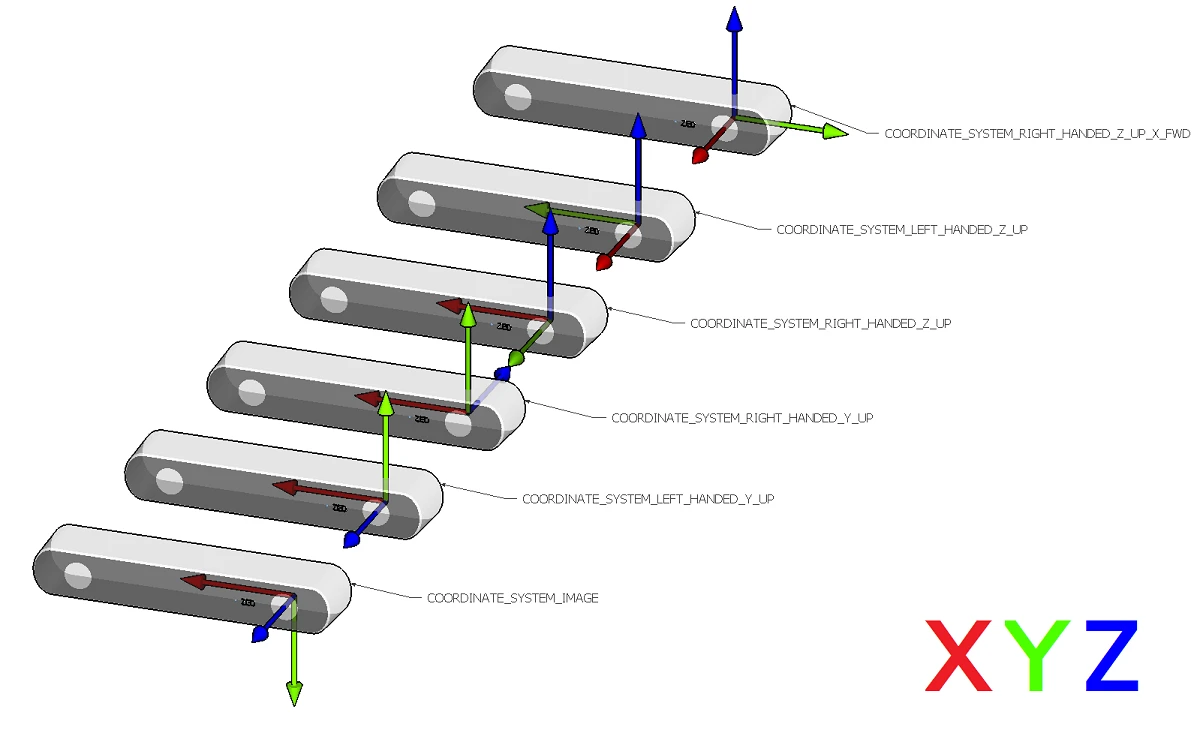
Lists available coordinates systems for positional tracking and 3D measures.
| Enumerator | |
|---|---|
| IMAGE | Standard coordinates system in computer vision. |
| LEFT_HANDED_Y_UP | Left-handed with Y up and Z forward. |
| RIGHT_HANDED_Y_UP | Right-handed with Y pointing up and Z backward. |
| RIGHT_HANDED_Z_UP | Right-handed with Z pointing up and Y forward. |
| LEFT_HANDED_Z_UP | Left-handed with Z axis pointing up and X forward. |
| RIGHT_HANDED_Z_UP_X_FWD | Right-handed with Z pointing up and X forward. |
|
strong |
Lists error codes in the ZED SDK.
| Enumerator | |
|---|---|
| SENSOR_CONFIGURATION_CHANGED | The sensor's configuration (mode, multicast, etc.) was changed externally while streaming. If auto_recovery_on_config_change is enabled, the SDK will automatically reconnect. This warning code is returned once after successful recovery. |
| POTENTIAL_CALIBRATION_ISSUE | The camera has a potential calibration issue |
| CONFIGURATION_FALLBACK | The operation could not proceed with the target configuration but did success with a fallback. |
| SENSORS_DATA_REQUIRED | The input data does not contains the high frequency sensors data, this is usually because it requires newer SVO/Streaming. In order to work this modules needs inertial data present in it input. |
| CORRUPTED_FRAME | The image is corrupted with invalid colors (green/purple images). This indicates a serious hardware or driver issue. Check camera connection and drivers. |
| CAMERA_REBOOTING | The camera is currently rebooting. |
| SUCCESS | Standard code for successful behavior. |
| FAILURE | Standard code for unsuccessful behavior. |
| NO_GPU_COMPATIBLE | No GPU found or CUDA capability of the device is not supported. |
| NOT_ENOUGH_GPU_MEMORY | Not enough GPU memory for this depth mode, try a different mode (such as PERFORMANCE), or increase the minimum depth value (see InitParameters::depth_minimum_distance). |
| CAMERA_NOT_DETECTED | No camera was detected. |
| SENSORS_NOT_INITIALIZED | The MCU that controls the sensors module has an invalid serial number. You can try to recover it by launching the ZED Diagnostic tool from the command line with the option |
| SENSORS_NOT_AVAILABLE | A camera with sensor is detected but the sensors (IMU, barometer, ...) cannot be opened. Only the MODEL::ZED does not has sensors. Unplug/replug is required. |
| INVALID_RESOLUTION | In case of invalid resolution parameter, such as an upsize beyond the original image size in Camera::retrieveImage. |
| LOW_USB_BANDWIDTH | Insufficient bandwidth for the correct use of the camera. This issue can occur when you use multiple cameras or a USB 2.0 port. |
| CALIBRATION_FILE_NOT_AVAILABLE | The calibration file of the camera is not found on the host machine. Use ZED Explorer or ZED Calibration to download the factory calibration file. |
| INVALID_CALIBRATION_FILE | The calibration file is not valid. Try to download the factory calibration file or recalibrate your camera using ZED Calibration. |
| INVALID_SVO_FILE | The provided SVO file is not valid. |
| SVO_RECORDING_ERROR | An error occurred while trying to record an SVO (not enough free storage, invalid file, ...). |
| SVO_UNSUPPORTED_COMPRESSION | An SVO related error, occurs when NVIDIA based compression cannot be loaded. |
| END_OF_SVOFILE_REACHED | SVO end of file has been reached. |
| INVALID_COORDINATE_SYSTEM | The requested coordinate system is not available. |
| INVALID_FIRMWARE | The firmware of the camera is out of date. Update to the latest version. |
| INVALID_FUNCTION_PARAMETERS | Invalid parameters have been given for the function. |
| CUDA_ERROR | A CUDA error has been detected in the process, in Camera.grab() or Camera.retrieveXXX() only. Activate verbose in Camera.open() for more info. |
| CAMERA_NOT_INITIALIZED | The ZED SDK is not initialized. Probably a missing call to Camera.open(). |
| NVIDIA_DRIVER_OUT_OF_DATE | Your NVIDIA driver is too old and not compatible with your current CUDA version. |
| INVALID_FUNCTION_CALL | The call of the function is not valid in the current context. Could be a missing call of Camera.open(). |
| CORRUPTED_SDK_INSTALLATION | The ZED SDK was not able to load its dependencies or some assets are missing. Reinstall the ZED SDK or check for missing dependencies (TensorRT). |
| INCOMPATIBLE_SDK_VERSION | The installed ZED SDK is incompatible with the one used to compile the program. |
| INVALID_AREA_FILE | The given area file does not exist. Check the path. |
| INCOMPATIBLE_AREA_FILE | The area file does not contain enough data to be used or the DEPTH_MODE used during the creation of the area file is different from the one currently set. |
| CAMERA_FAILED_TO_SETUP | Failed to open the camera at the proper resolution. Try another resolution or make sure that the UVC driver is properly installed. |
| CAMERA_DETECTION_ISSUE | Your camera can not be opened. Try replugging it to another port or flipping the USB-C connector (if there is one). |
| CANNOT_START_CAMERA_STREAM | Cannot start the camera stream. Make sure your camera is not already used by another process or blocked by firewall or antivirus. |
| NO_GPU_DETECTED | No GPU found. CUDA is unable to list it. Can be a driver/reboot issue. |
| PLANE_NOT_FOUND | Plane not found. Either no plane is detected in the scene, at the location or corresponding to the floor, or the floor plane doesn't match the prior given. |
| MODULE_NOT_COMPATIBLE_WITH_CAMERA | The module you try to use is not compatible with your camera MODEL.
|
| MOTION_SENSORS_REQUIRED | The module needs the sensors to be enabled (see InitParameters::sensors_required). |
| MODULE_NOT_COMPATIBLE_WITH_CUDA_VERSION | The module needs a newer version of CUDA. |
| DRIVER_FAILURE | The drivers initialization has failed. When using gmsl cameras, try restarting with sudo systemctl restart zed_x_daemon.service |
| CAMERA_EXCEEDS_BANDWIDTH | The camera configuration exceeds available PHY CSI bandwidth (GMSL). Reduce resolution/FPS or adjust hardware configuration. |
|
strong |
Lists how much GPU a module is allowed to use.
| Enumerator | |
|---|---|
| AUTO | Default. Let the SDK choose. For positional tracking, POSITIONAL_TRACKING_MODE::GEN_3 runs on the CPU and POSITIONAL_TRACKING_MODE::GEN_1 uses the GPU, since it computes depth. |
| PREFER_CPU | Use no more GPU than the selected mode requires, leaving the GPU free for your own workloads. Tracking is slower than with GPU acceleration. |
| PREFER_GPU | Use GPU acceleration wherever it is available, which makes tracking faster and lowers the per-frame time of sl::Camera::grab(). Falls back to the CPU by itself if the GPU cannot be used. |
|
strong |
Lists the lens distortion models used to describe a camera's optics.
|
strong |
Lists available sensor types.
|
strong |
Lists available measurement units of onboard sensors.
| Enumerator | |
|---|---|
| M_SEC_2 | m/s² (acceleration) |
| DEG_SEC | deg/s (angular velocity) |
| U_T | μT (magnetic field) |
| HPA | hPa (atmospheric pressure) |
| CELSIUS | °C (temperature) |
| HERTZ | Hz (frequency) |
|
strong |
|
strong |
Lists available copy operation on sl::Mat.
| Enumerator | |
|---|---|
| CPU_CPU | Copy data from CPU to CPU. |
| CPU_GPU | Copy data from CPU to GPU. |
| GPU_GPU | Copy data from GPU to GPU. |
| GPU_CPU | Copy data from GPU to CPU. |
|
strong |
Lists available sl::Mat formats.
|
strong |
|
strong |
| int getZEDSDKRuntimeVersion | ( | int & | major, |
| int & | minor, | ||
| int & | patch | ||
| ) |
Returns the ZED SDK version currently installed on the computer.
| [out] | major | : Major variable to be filled. |
| [out] | minor | : Minor variable to be filled. |
| [out] | patch | : Patch variable to be filled. |
|
inline |
Returns the ZED SDK version which the current program has been compiled with.
| [out] | major | : Major variable to be filled. |
| [out] | minor | : Minor variable to be filled. |
| [out] | patch | : Patch variable to be filled. |
| String sl::toVerbose | ( | const ERROR_CODE & | errorCode | ) |
Provide a concise sl::ERROR_CODE string.
| bool sl::isCameraOne | ( | const sl::MODEL | ) |
Check the type of a camera model.
|
inline |
Blocks the execution of the current thread for time milliseconds.
| time | : Number of milliseconds to wait. |
|
inline |
Blocks the execution of the current thread for time microseconds.
| time | : Number of microseconds to wait. |