The new streaming feature turns ZED cameras into IP cameras, offering the following advantages for multiple-camera setups:
Flexible Architecture: Users can now connect as many ZED cameras as needed, directly to a network. An unlimited number of remote computers, also running the SDK, can use the stream as input as though they were connected over USB.
Easy Collaboration: Several users can simultaneously access any video feed on the network, making teamwork a lot easier.
Simple Installation: Users can deploy ZED cameras anywhere reachable by Ethernet cabling, enabling long-range and outdoor coverage.
Compute Efficiency: Users can now offload the image processing workload for multiple ZEDs onto a single powerful server. This improves the efficiency of compute-heavy applications, such as deep learning, by processing images in batches.
Lower TCO (total cost of ownership): Since ZED cameras don’t need their images processed locally, they can run on low-cost intermediary devices such as the NVIDIA Jetson Nano, cutting down on hardware setup requirements.
General Workflow
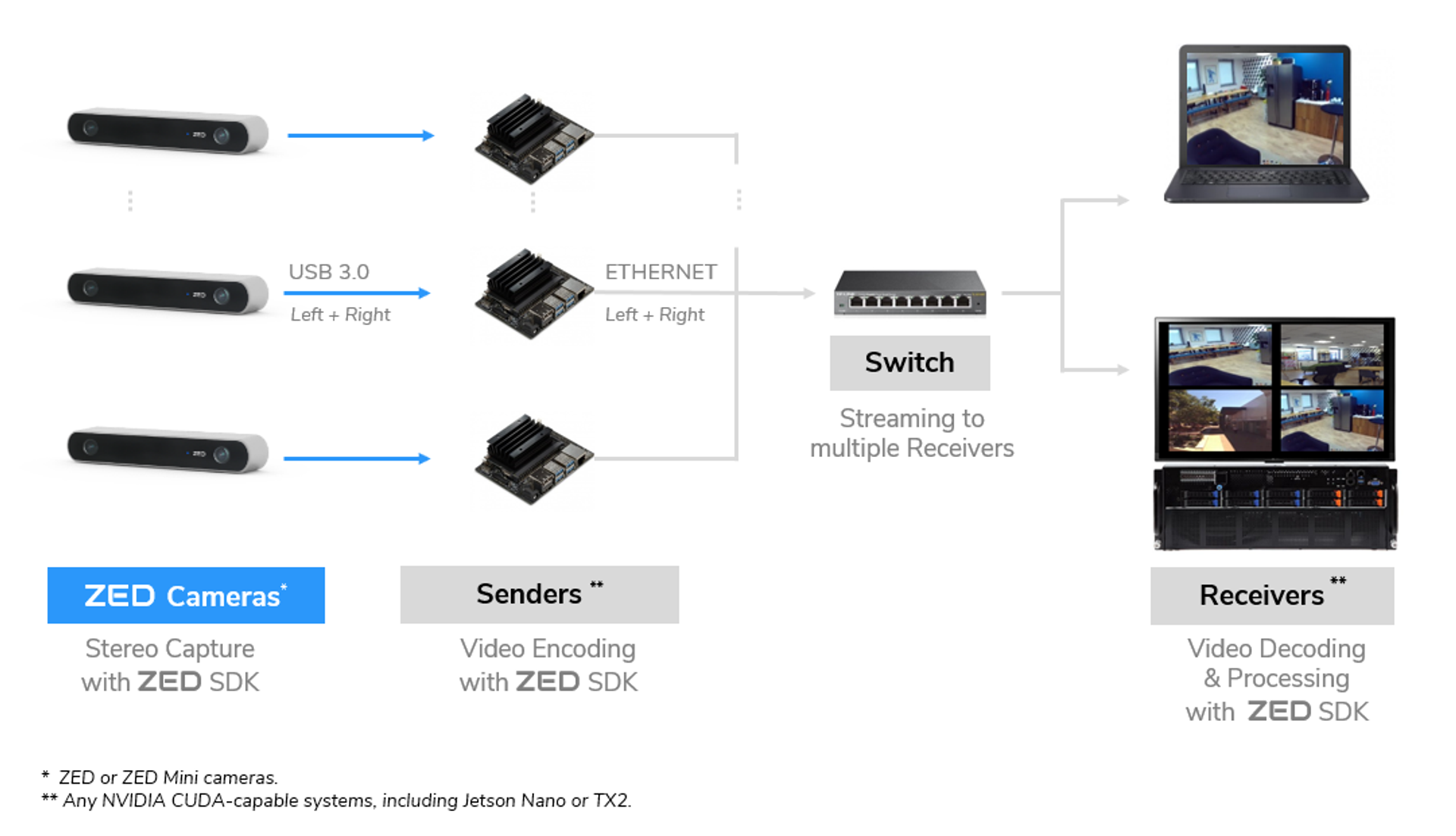
The Sender is responsible for encoding and streaming an attached ZED’s video via the local network. For performance purposes, the ZED SDK uses hardware-based encoders built into NVIDIA graphics cards (H.264 or H.265). Please note that for H.265 encoding, a Pascal GPU or a Jetson is required.
On the other side, the Receiver reads the stream and processes the images using the ZED SDK. Therefore, the Receiver also requires an NVIDIA GPU as it is a requirement for the SDK.
Both the Sender and Receiver must be connected to the same local network. For best performance, connect the Sender and Receiver via an Ethernet switch instead of using Wi-Fi (see General Workflow).
Both the ZED and ZED Mini cameras support the Streaming features needed for this workflow.
Software Setup
Our API makes it easy to write software that takes advantage of multiple ZED cameras. We’ll walk through the basics here. You can see complete code examples on GitHub for both the Sender and Receiver network roles.
Note: We’ll assume you’re using the ZED C++ API for the purposes of this guide, but we also support Streaming in our ROS, Python and Unity plugins as well.
Prerequisites
- ZED SDK 2.8 or greater installed on all Senders and Receivers
- Local network connecting all Senders and Receivers
Sender
You must install the ZED SDK on the Sender device to encode the video feed. To start the stream:
- Open the ZED camera with
open() - Set the streaming parameters
- Call
enableStreaming() with the streaming parameters - Grab the camera frames with
grab() - Disable the streaming before exiting with
disableStreaming()
// Open the camera
zed.open();
// Set the streaming parameters
sl::StreamingParameters stream_params;
stream_params.codec = sl::STREAMING_CODEC_AVCHD; // can be AVCHD or HEVC
stream_params.bitrate = 8000;
stream_params.port = 30000; // port used for sending the stream
// Enable streaming with the streaming parameters
err = zed.enableStreaming(stream_params);
while (!exit_app) {
     zed.grab();
}
// Disable streaming
zed.disableStreaming();
Refer to the following table to choose the ideal bitrate for your situation:
Receiver
To initialize the ZED SDK using a stream as input, specify the IP address and port of the sender:
- Set the input from the desired IP address and port by using
setFromStream() - Open the camera with
open() - Grab images directly from the stream with
grab()
// Set the input from stream
InitParameters initParameters;
initParameters.input.setFromStream("127.0.0.1", 30000); // Specify the IP and port of the sender
// Open the camera
ERROR_CODE zed_error = zed.open(initParameters);
while (!exit_app) {
   if (zed.grab() == SUCCESS) {
      // Any processing
   }
}
// Close the camera
zed.close();
Use getStreamingDeviceList() to list the available streaming devices. This function returns the IP address and port of all valid Senders present on the local network.