A robot perception pipeline is a chain of ROS 2 nodes: the camera publishes images and depth, and the next nodes detect objects, build maps and plan motions. On NVIDIA Jetson, most of these steps run on the GPU. Until now, the data passed between them still took a detour through the CPU; every image and every point cloud was copied out of GPU memory, serialized, sent, and copied back to the GPU by the next node.
NVIDIA contributed rosidl::Buffer and the CUDA buffer backend to ROS 2 Lyrical in collaboration with the Open Source Robotics Alliance: an open, vendor-neutral way for ROS 2 nodes to exchange GPU memory without copies. NVIDIA Isaac ROS 5.0, a collection of CUDA-accelerated runtime libraries and AI models for ROS 2, was released at ROSCon 2026 in Toronto and builds its accelerated data path on it.
Stereolabs ZED ROS 2 Wrapper 5.6 adopts the same rosidl::Buffer with CUDA buffer backend standard. It is the next step after the native ZED support in NVIDIA Isaac ROS: ZED data is now published with CUDA buffers, directly from the GPU memory where the ZED SDK computes them.
Let's explore what's new.
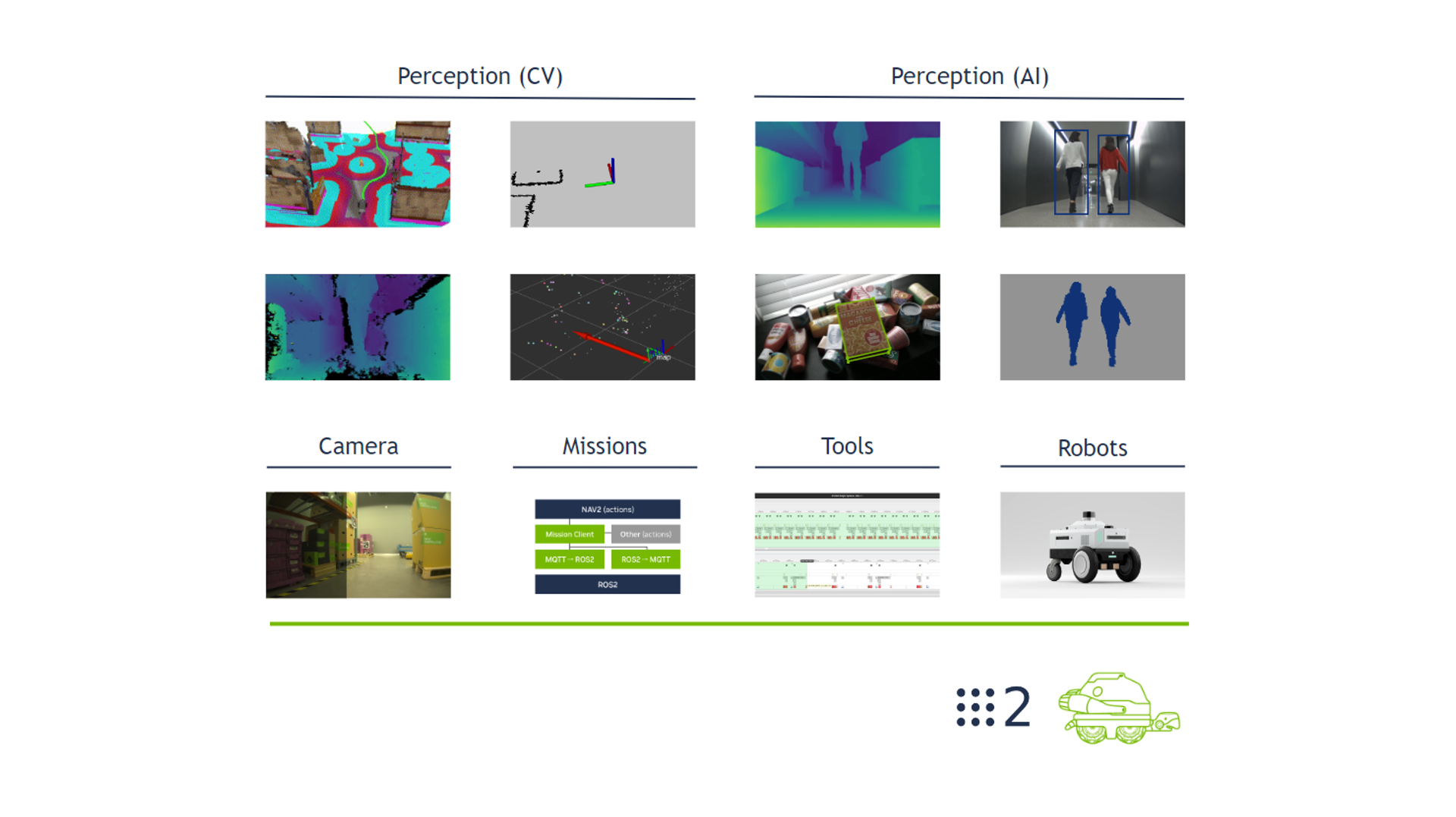
Figure: NVIDIA Isaac ROS: GPU-accelerated packages for robot perception and navigation. Image source: NVIDIA Isaac ROS documentation.
The Detour Through the CPU
In a standard ROS 2 graph, a message travels as a serialized block of bytes in CPU memory. When both the publisher and the subscriber work on the GPU, every message pays four extra steps: the ZED node copies the data from the GPU to the CPU (1), the middleware serializes the full payload (2), the middleware of the subscriber deserializes it (3), and the subscriber copies it back to the GPU (4) before running its CUDA kernels. For a single HD1080 image, that is 8.3 MB moved twice through the memory bus, 30 or 60 times per second.
Figure: The CPU path: every message crosses the CPU memory, even between two GPU-accelerated nodes.
rosidl::Buffer and the CUDA Buffer Backend
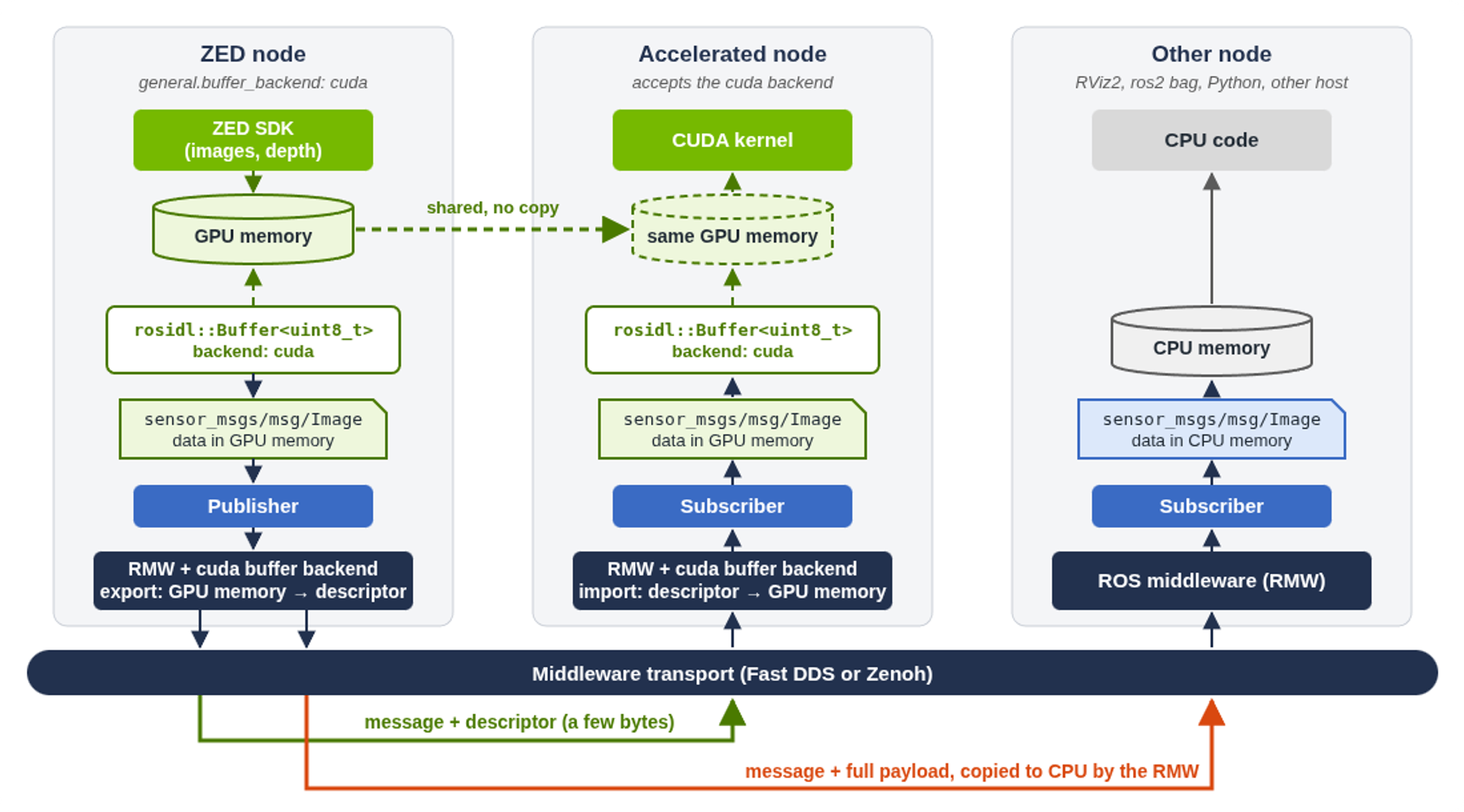
In ROS 2 Lyrical, the uint8[] data field of messages such as sensor_msgs/msg/Image and sensor_msgs/msg/PointCloud2 is a rosidl::Buffer, and its memory can live on the GPU. With the CUDA buffer backend, the middleware of the ZED node exports the GPU memory filled by the ZED SDK as a small descriptor and sends it with the message. The middleware of the subscriber imports the descriptor and maps the same GPU memory, so the CUDA kernels of the subscriber read the data where the ZED SDK wrote it.
The publisher middleware chooses the transport for each subscriber. Subscribers that cannot use the CUDA backend, such as RViz2, ros2 bag, Python nodes, or nodes on another computer, automatically receive standard CPU data, so the ZED node does not need to know who is listening.
Figure: The CUDA zero-copy path: accelerated nodes share the GPU memory of the ZED node, while the other subscribers automatically receive CPU data.
What You Get with ZED ROS 2 Wrapper 5.6
- GPU zero-copy for all the dense data. Images, depth maps, confidence maps and point clouds from the ZED stereo cameras, and the images of the ZED X One cameras, are published with CUDA buffers.
- Standard ROS 2 messages and topics. There are no special topics or message types: your node subscribes to the usual ZED topics and declares that it accepts the CUDA backend.
- Automatic CPU fallback. Visualization, recording and CPU-only nodes keep working as before, with no change on their side.
- On by default. The new general.buffer_backend parameter selects CUDA (default) or CPU. When a requirement is missing, the ZED node falls back to CPU data and reports the reason in its log.
- Fast DDS or Zenoh. The CUDA zero-copy transport works with the default rmw_fastrtps_cpp middleware and with rmw_zenoh_cpp 0.10.5 or newer.
- Two detailed examples. Step-by-step tutorials show how to subscribe to the ZED image and point cloud topics with the CUDA zero-copy transport, read the data in GPU memory, and compare the CPU and CUDA transports on your own hardware.
The Numbers: ZED on NVIDIA Jetson AGX Thor
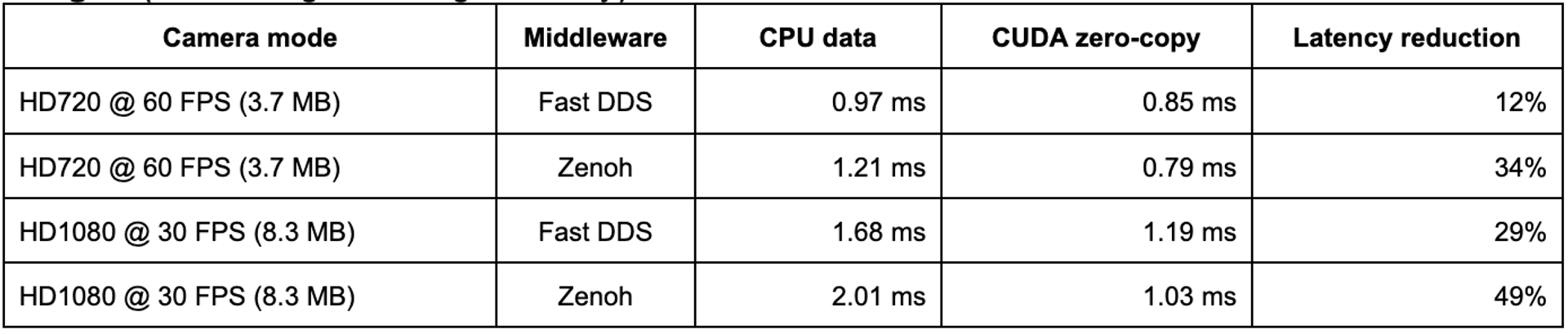
We measured the data transport with the two new examples of the ZED ROS 2 Examples repository. Each example subscribes to a ZED topic twice, first accepting only CPU data, then accepting the CUDA buffers, and it measures the latency from the publishing of the message to the availability of the data on the GPU of the subscriber. The tests were run on an NVIDIA Jetson AGX Thor Developer Kit in MAXN power mode with jetson_clocks running, using a ZED 2i camera and Isaac ROS 5 installed on bare metal. Each configuration ran twice, with 300 messages per phase.
Images (color image, average latency)
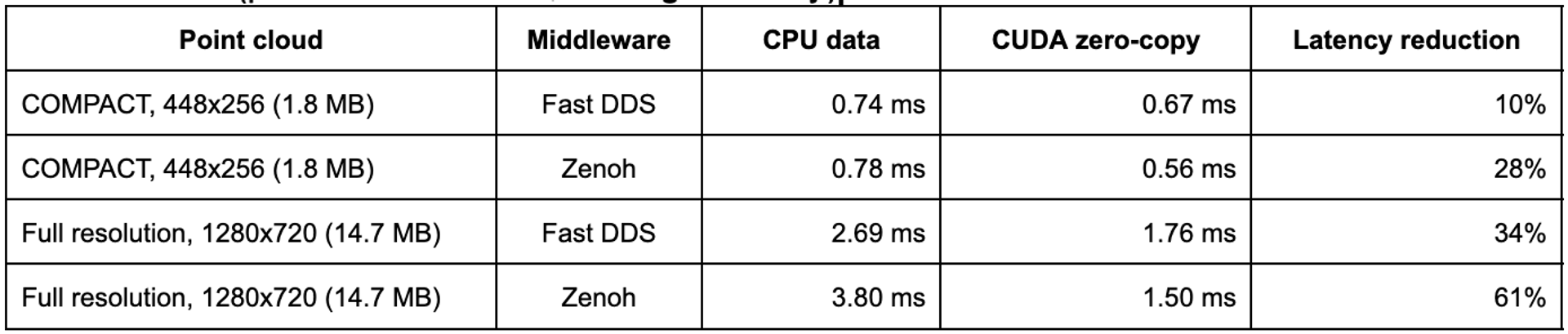
Point clouds (published at 30 Hz, average latency)
What the results show:
- Lower latency in every configuration. The gain grows with the size of the data: from 10% for a compact point cloud to 61% for a full-resolution point cloud of 14.7 MB.
- More stable latency. For the point clouds, the standard deviation of the latency is about three times lower with the CUDA zero-copy transport.
- Every message on the GPU. In the CUDA phase, all the images and point clouds were received as CUDA buffers, at the camera frame rate and at the point cloud publishing rate.
Note that results depend on the platform, its power mode, the camera, the resolution and the load of the system.
Fast DDS or Zenoh?
Both middlewares support the CUDA zero-copy transport, and the measurements help to choose. With CPU data, Fast DDS has the lowest latency: consider using it when most of the subscribers of the ZED topics read CPU data, such as RViz2, ros2 bag or Python nodes. With the CUDA zero-copy transport, Zenoh has a similar or lower latency than Fast DDS, and it gains the most from the transport: consider it when the ZED topics mainly feed GPU-accelerated nodes, or when you need its network features, such as discovery without UDP multicast on Wi-Fi networks.
Receive the ZED Data in GPU Memory
An accelerated node needs only two changes: (1) the subscription declares that it accepts the CUDA backend, and (2) the callback reads the GPU memory of each message through the
CUDA buffer API:
rclcpp::SubscriptionOptions sub_opts;sub_opts.acceptable_buffer_backends = "cuda";auto sub = create_subscription<sensor_msgs::msg::Image>( "image", qos, callback, sub_opts);// In the callbackif (img.data.get_backend_type() == "cuda") { auto rh = cuda_buffer_backend::from_input_buffer(img.data, stream); my_cuda_kernel(rh.get_ptr()); // GPU memory of the ZED node, no copy}
The same node keeps working with CPU data when the zero-copy transport is not available, for example when the ZED node runs on another computer. The two new examples, for images and for point clouds, show the complete code and run the benchmarks above on your own hardware.
Get Started
The CUDA zero-copy transport requires ROS 2 Lyrical, as provided by NVIDIA Isaac ROS 5, Stereolabs ZED ROS 2 Wrapper 5.6 or newer, and the cuda_buffer packages. The ZED node and the accelerated subscribers must run on the same computer and GPU. The new, detailed documentation explains step by step how to install Isaac ROS 5 and how to use it with ZED cameras, with both the Docker and the Bare Metal installation paths: choose a fully isolated development container, or a native installation on the host.