

Stereo Node Frequency Tuning
This guide applies only to the stereolabs::ZedCamera component for stereo cameras. The stereolabs::ZedCameraOne component for monocular cameras does not provide the behaviors described in this section.
The ZED Camera component of the zed_components package provides a set of parameters to configure the working frequency of different modules of the node. This allows you to optimize the node’s performance according to your needs.
The parameters discussed in this section are:
general.grab_frame_rate: Sets the maximum frequency at which the node will attempt to grab frames from the camera. This is a global parameter that affects all modules that rely on camera frames. It reflects the usage of theInitParameters::camera_fpsparameter of the ZED SDK.general.grab_compute_capping_fps: Defines an upper computation limit for the grab frequency. It reflects the usage of theInitParameters::grab_compute_capping_fpsparameter of the ZED SDK.general.pub_frame_rate: Frequency of publishing visual image and depth data messages (point cloud excluded).depth.point_cloud_freq: Frequency of publishing point cloud messages.sensors.sensors_pub_rate: Maximum frequency of publishing sensor data messages.
Minimize the end-to-end latency
The end-to-end latency of the ZED cameras depends on the grab frequency. The latency is fixed and equal to 2-3 frames for GMSL2 cameras and 3-4 frames for USB3 cameras. Therefore, the shorter the period between two consecutive frame grabs, the lower the end-to-end latency of the system.
To minimize latency, set the general.grab_frame_rate parameter to the highest value your camera supports for the selected resolution:
Optimize CPU usage
Minimizing the end-to-end latency maximizes CPU usage, because the ZED SDK processing is forced to run at the maximum frequency. If you want to reduce CPU usage, either because your application does not require maximum performance or because the available computational power is not sufficient, set the general.grab_compute_capping_fps parameter to a value lower than the general.grab_frame_rate parameter. This limits the internal ZED SDK processing frequency, reducing CPU usage while maintaining low end-to-end latency, since this parameter does not affect the low-level behavior of the grab process.
Furthermore, the general.grab_compute_capping_fps parameter is not restricted to the fixed values of the general.grab_frame_rate parameter (i.e., 15, 30, 60, 100, 120), so you can set it to any value from 0.1 FPS up to the value of the general.grab_frame_rate parameter. This allows you to find the best compromise between performance and CPU usage for your application. You can set the value to 0.0 to disable the capping behavior and let the ZED SDK run at the maximum frequency defined by the general.grab_frame_rate parameter.
This parameter affects the maximum output frequency of the Image retrieval, Depth retrieval (depth maps and point cloud), Positional Tracking (odometry, pose, and tf publishing), Object Detection, and Body Tracking modules. If you set it lower than the general.grab_frame_rate parameter, the actual maximum output frequency of these modules will match the value of the general.grab_compute_capping_fps parameter.
The value to use for this parameter depends on your machine’s processing power and the overall configuration of the node, e.g., the grab resolution, the depth mode, the positional tracking settings, and the Object Detection and Body Tracking modules.
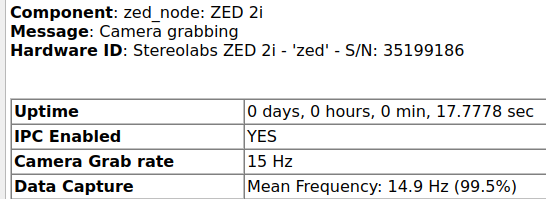
The recommended approach to find the best value for this parameter is to start with a value equal to the general.grab_frame_rate parameter and then decrease it at runtime while monitoring the Diagnostic feedback. Optimal values are obtained when the “Data Capture - Mean Frequency” average value is higher than 99.5% of the general.grab_frame_rate parameter:
Tune the output frequency of the topics
Most robotics applications do not require the maximum output frequency of all topics published by the ZED Camera node.
Keep in mind that a higher output frequency means higher CPU usage, due to middleware processing running in the background to publish messages, and higher bandwidth usage, which can lead to network congestion if you are using a wireless connection.
For example:
- If you are using the ZED Camera for obstacle avoidance, tune the output frequency of the point cloud topic to a value that meets safety requirements according to the robot’s maximum speed.
- If you use images only for visualization, set the output frequency of the image topics to a value that provides smooth visualization without overloading the CPU or network.
- If you are using the ZED Camera for SLAM, set the output frequency of the image and depth topics to a value that ensures good SLAM performance without overloading the CPU or network.
- If you are using IMU information for state estimation, set the output frequency of the IMU topic to a value that ensures good performance of the state estimation algorithm without overloading the CPU or network.
The general.pub_frame_rate, depth.point_cloud_freq, and sensors.sensors_pub_rate parameters are dynamic, so you can tune them at runtime according to your needs.
You can use the same approach described in the previous section to find the best values for these parameters, monitoring the Diagnostic feedback and finding the best compromise between performance and resource usage for your application.
The Diagnostic feedback accurately reports the actual average publishing frequency of each topic, as it is measured internally by the ZED Camera node based on each publish function call.
If you try to monitor the frequency of a topic using external subscribing tools (e.g., rostopic hz or Topic Monitor in rqt) and the obtained frequency is lower than expected, you are probably overloading the middleware processing or the network, and you should consider decreasing the output frequency of the topics.