

ZED Link Quad GPIO Triggering
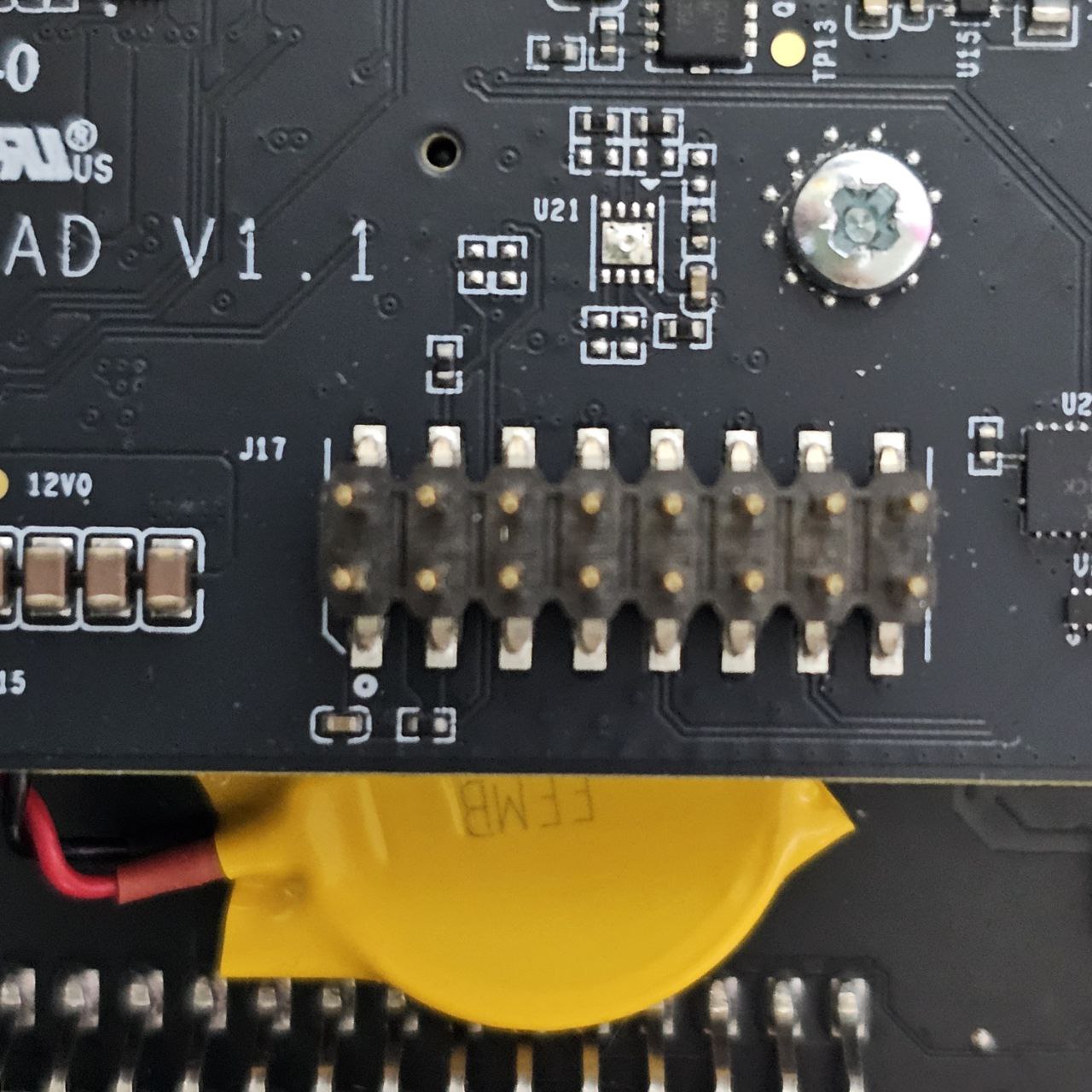
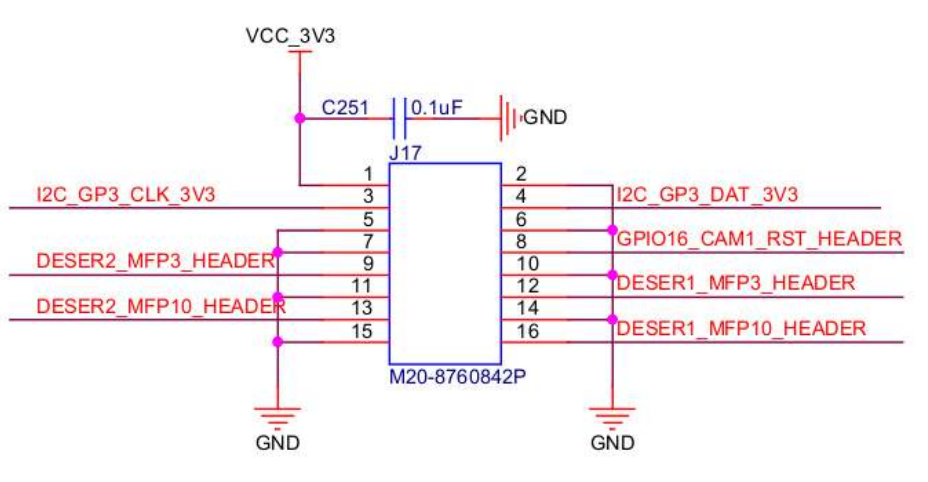
The ZED Link Quad GMSL2 capture card allows you to synchronize external sensors by using triggering signals on the 16-pin 2mm pitch GPIO connector J17.
Master mode - Trigger out
The ZED Link Quad capture card is configured to operate in master mode by default.
In any case, if you change mode, you can set the card back to master mode by setting sync_mode=0 in the file /etc/systemd/system/zed_x_daemon.service and restarting the ZED X daemon service:
The default content of the file /etc/systemd/system/zed_x_daemon.service is as follows:
The output synchronization signals are available on pin #16 and pin #13 of the GPIO connector J17 as soon as the Jetson™ device boots and the ZED Link GMSL2 driver is installed.
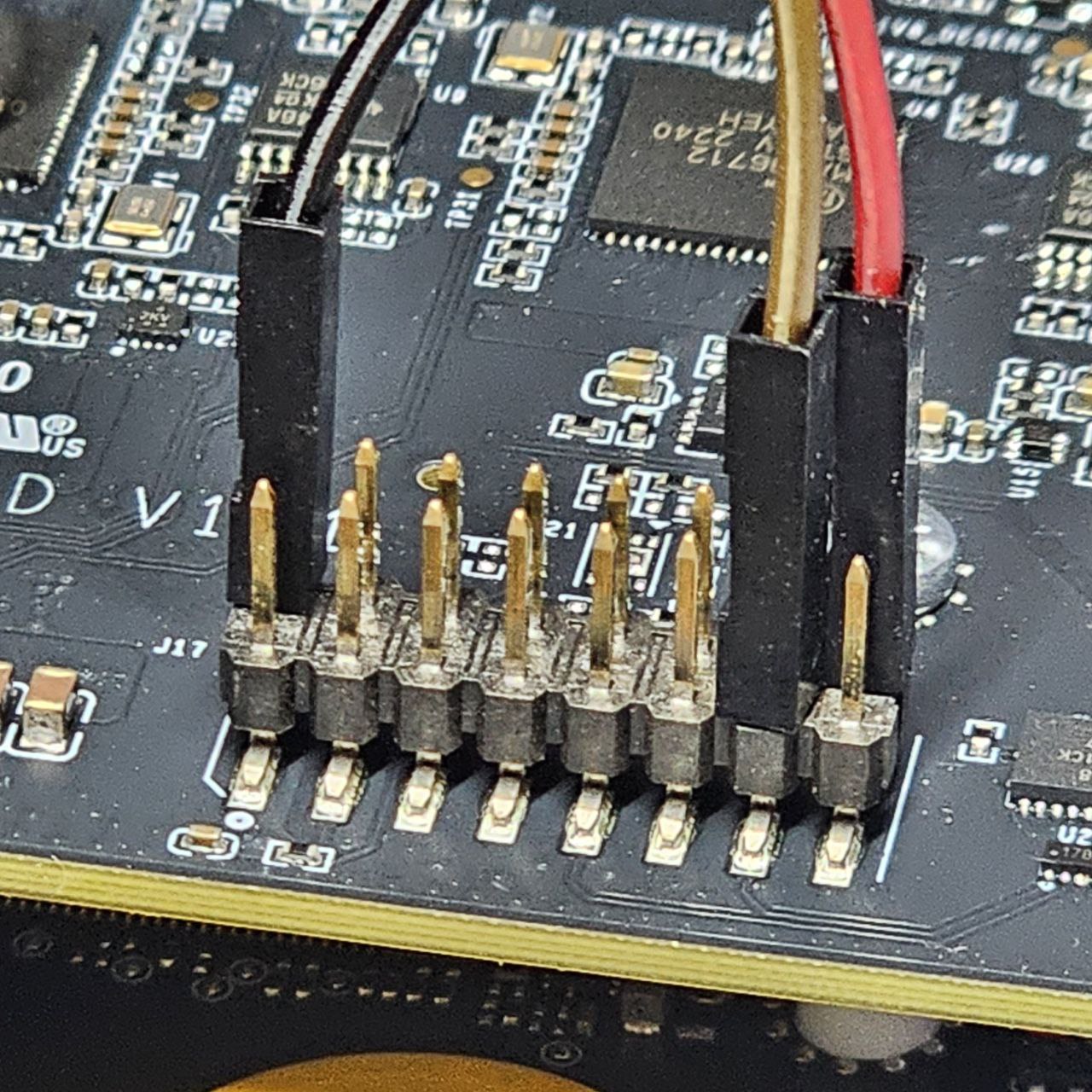
- Connect the ground signal (Black - GND) to pin #2
- Connect the trigger out signal of the GMSL2 port
J1(Red - DESER1_MFP10) to pin #16 - Connect the trigger out signal of the GMSL2 port
J2(Brown - DESER2_MFP10) to pin #13
Triggering signals
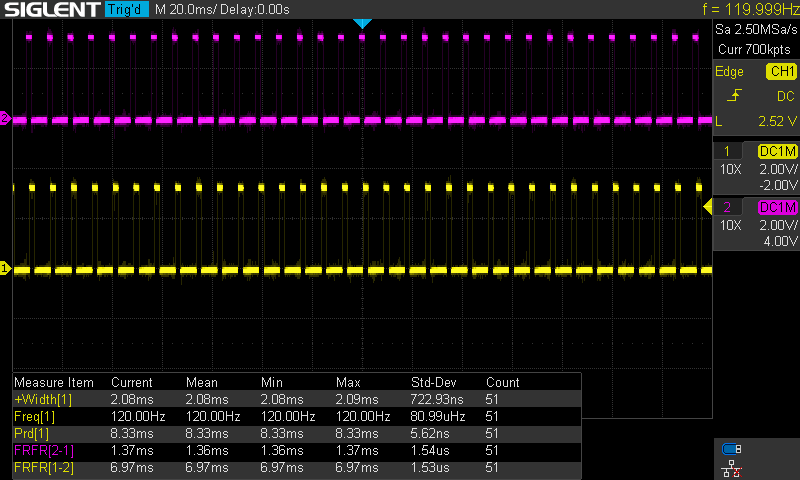
The output trigger signals are two square waves, with their rising edges synchronized with the end of the exposure phase of the CMOS sensors.
The signals have a fixed Amplitude of 3.3V ± 1%, while Width and Frequency change according to the frame rate setting of the camera.
The two deserializers installed on the ZED Link Quad are not synchronized, so the cameras connected to GMSL2 connectors J1 and J2 will have a variable capture offset, depending on the camera open time. Only the four cameras connected to the same GMSL2 connector are natively synchronized. To enable full synchronization of all the connected cameras, please follow the procedure described in the ZED Link Quad Jetson Orin AGX Devkit Setup or ZED Link Quad Jetson Xavier AGX Devkit Setup guides.
Frame rate: 120 FPS - ZED X / ZED X Mini / ZED X Nano / ZED X One GS / ZED X One S
- Amplitude: 3.3V ± 1%
- Width: 2.08 msec
- Frequency: 120 Hz
- Period: 8.33 msec
Frame rate: 60 FPS - ZED X / ZED X Mini / ZED X Nano / ZED X One GS / ZED X One S / ZED X One 4K
- Amplitude: 3.3V ± 1%
- Width: 4.17 msec
- Frequency: 60 Hz
- Period: 16.67 msec
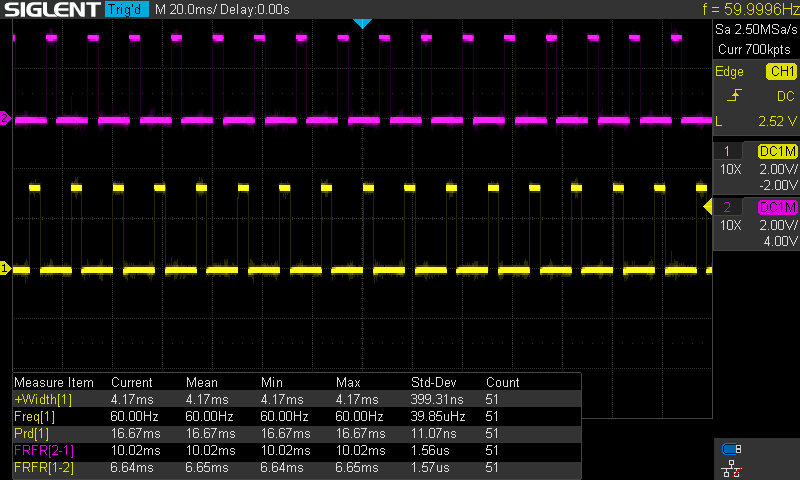
Frame rate: 30 FPS - ZED X / ZED X Mini / ZED X Nano / ZED X One GS / ZED X One S / ZED X One 4K
- Amplitude: 3.3V ± 1%
- Width: 8.33 msec
- Frequency: 30 Hz
- Period: 33.33 msec
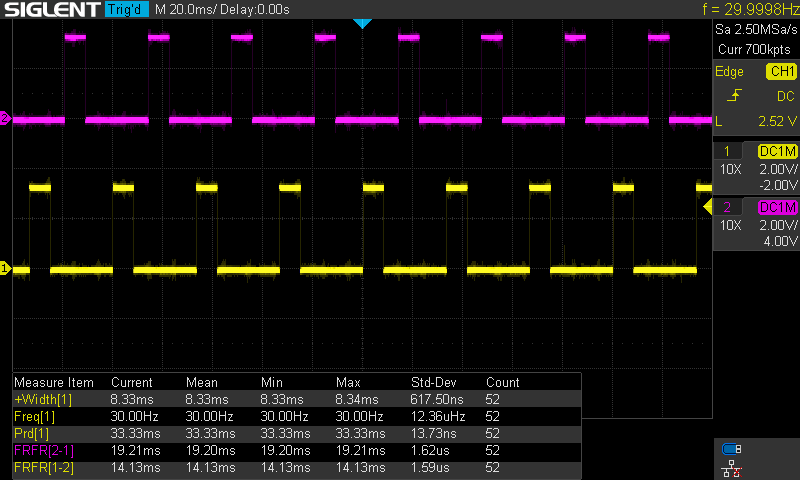
Frame rate: 15 FPS - ZED X / ZED X Mini / ZED X Nano / ZED X One GS / ZED X One S / ZED X One 4K
- Amplitude: 3.3V ± 1%
- Width: 16.67 msec
- Frequency: 15 Hz
- Period: 66.67 msec
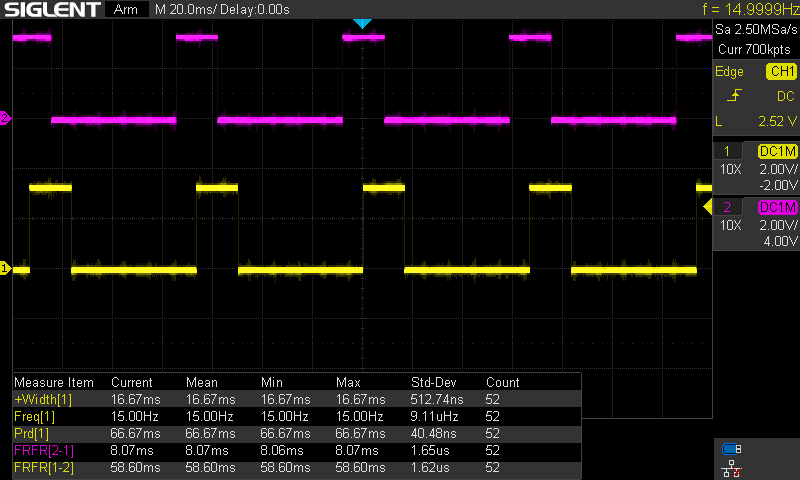
The two signals are not synchronized between them when the board is in master mode. To synchronize both signals, please follow the procedure described in the ZED Link Quad Jetson Orin AGX Devkit Setup or ZED Link Quad Jetson Xavier AGX Devkit Setup guides.
Slave mode - Trigger in
The ZED Link Quad capture card requires specific commands to switch to slave mode.
-
Set
sync_mode=2in the file/etc/systemd/system/zed_x_daemon.serviceto enable the external trigger input. -
Reload the systemd configuration:
-
Connect PIN #2 (
GND) to the ground signal of the trigger source. -
Connect PIN #13 (
DESER2_MFP10_HEADER) and PIN #16 (DESER1_MFP10_HEADER) to the trigger input signal, i.e., a 3.3V square wave signal. -
Restart the driver by restarting the ZED X daemon service:
To verify that the Slave configuration is active, run the command:
The output should be similar to:
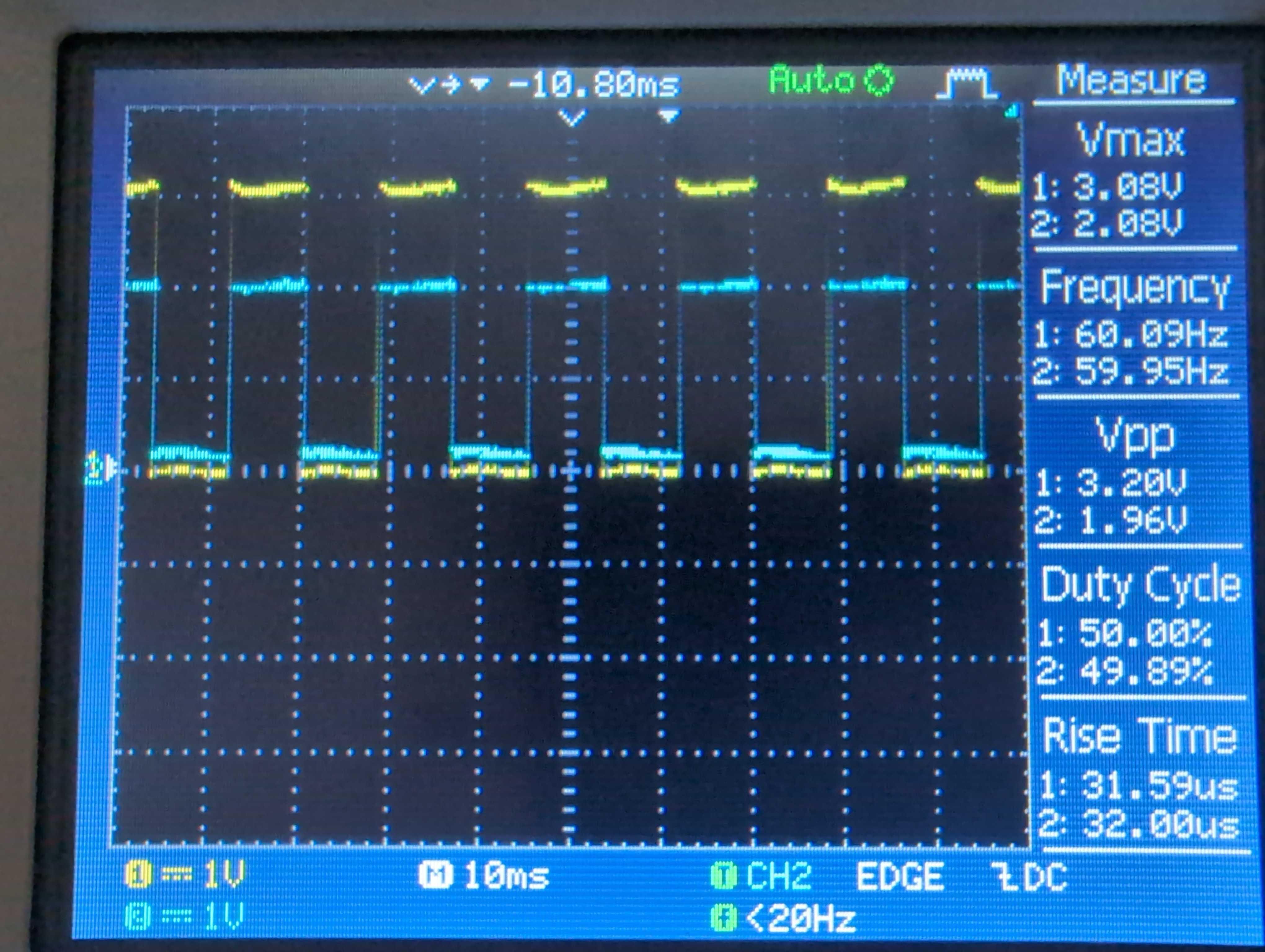
You must use an external trigger signal with the following characteristics:
- Square wave
- Amplitude: 3.3V ± 10%
- Frequency: Match the camera grab frame rate setting used with the ZED SDK - 15Hz, 30Hz, 60Hz, or 120Hz
Disable synchronization
To disable the hardware synchronization, set sync_mode=0 in the file /etc/systemd/system/zed_x_daemon.service and restart the ZED X daemon service:
The content of the file /etc/systemd/system/zed_x_daemon.service should look like: