
Using GMSL with ZED Box Orin
If your ZED Box comes with an embedded capture card, you can use a ZED X or any other GMSL camera.
GMSL driver #
The ZED X requires a GMSL driver. It comes already installed with the ZED Box.
You may need to install it manually, especially if you upgraded your system version. Go to our website and download the driver version that fits with your L4T version.
To know your jetpack version, run
cat /etc/nv_tegra_release
You will obtain an output like this:
# R35 (release), REVISION: 4.1, GCID: 33958178, BOARD: t186ref, EABI: aarch64, DATE: Tue Aug 1 19:57:35 UTC 2023
In this example, the L4T version is 35.4.1.
Then, open a terminal in the folder that contains the downloaded driver and run
sudo dpkg -i <the deb file path>
and reboot.
Multi-camera configurations #
ZED Box Orin with 4-wire GMSL2 connectivity #
The ZED Box Orin provides 4 GMSL2 ports organized in 2 Groups (A, B):
- Group A: port #0 and port #1
- Group B: port #2 and port #3
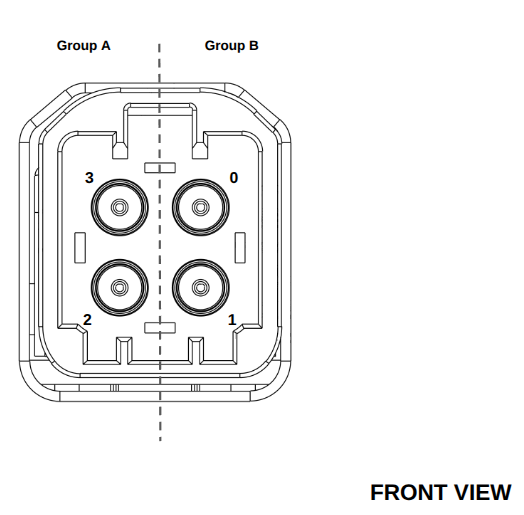
Please refer to the table below to understand how different camera configurations provide different image capture behaviors, according to the number of cameras, their type, and the Group they are connected to:
| Camera Type | Camera Model | Max number of camerasper Group | Max Resolution/FPSper Group |
|---|---|---|---|
| Monocular | ZED X One GSZED X One S | Up to 2 cameras | HD1200@60fpsHD1080@60fpsSVGA@120fps |
| Monocular | ZED X One 4k | 1 cameraonly to port #0, #2 | 4k@15fpsHD1080@60fpsSVGA@60fps |
| Stereo | ZED XZED X Mini | 1 Camera | HD1200@60fpsHD1080@60fpsSVGA@120fps |
| Stereo | ZED XZED X Mini | Up to 2 Cameras | HD1200@30fpsHD1080@30fpsSVGA@60fps |
| Mixed* | ZED X One GS/ZED X One S+ZED X/ZED X Mini | 1 ZED X One GS/S + 1 ZED X/Mini | HD1200@60fpsHD1080@60fpsSVGA@120fps |
* Mixed configurations are not available with older version of the ZED Box powered by Jetson Xavier NX modules.
📌 Note: Maximum resolution and framerate require no more than 2 cameras per 4-wire GMSL2 Fakra connector.
ZED Box Orin with mono GMSL2 port (out of production) #
This out of production version of the ZED Box Orin provides a single GMSL2 port, so only one camera can be connected.
The table below illustrates the different behaviors that can be expected according to the camera type:
| Camera Type | Camera Model | Max Resolution/FPS |
|---|---|---|
| Monocular | ZED X One GSZED X One S | HD1200@60fpsHD1080@60fpsSVGA@120fps |
| Monocular | ZED X One 4k | 4k@15fpsHD1080@60fpsSVGA@60fps |
| Stereo | ZED XZED X Mini | HD1200@60fpsHD1080@60fpsSVGA@120fps |
Developing your own driver #
If you intend to use a GMSL device alongside a Stereolabs ZED X camera, a custom driver is required for compatibility.
In such cases, we recommend reaching out to our support team at support@stereolabs.com for more information and assistance.